Who above you knows about the thing you fixed on Tuesday?
If the answer is “nobody”… you’re not alone!
In Microsoft’s 2022 survey of more than 20,000 knowledge workers, 54% of hybrid managers said they have less visibility into the work their employees do. Among managers who work fully in person, it was still 38%.1
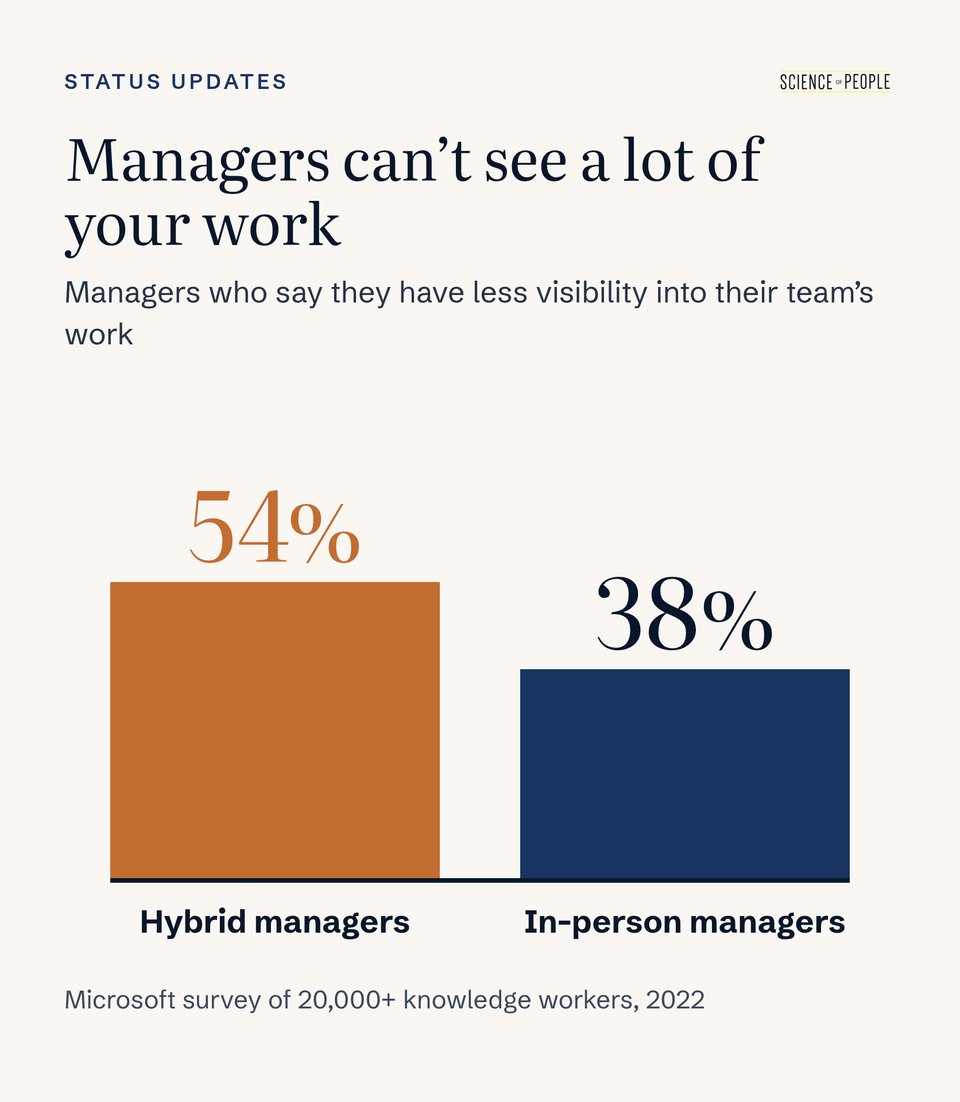
Yikes, that’s low! Even sitting 10 feet from someone doesn’t tell you what’s on their screen.
So how do we give real status updates that drive real results and have real meaning?
Which Status Update Would You Rather Get?
Say you’re Marty, and Brian on your team sends you this on Friday at 4:55:
Hi Marty! Quick update on this week. Spent a lot of time on the onboarding launch, lots of back and forth with design but it’s finally out. Had a few calls with the vendor about the contract, which was a whole thing. Still working through some data issues on the dashboard, should be sorted soon hopefully. Next week I’ll keep pushing on all of the above. Shout if you have any questions!
Or Brian sends this, about the exact same week:
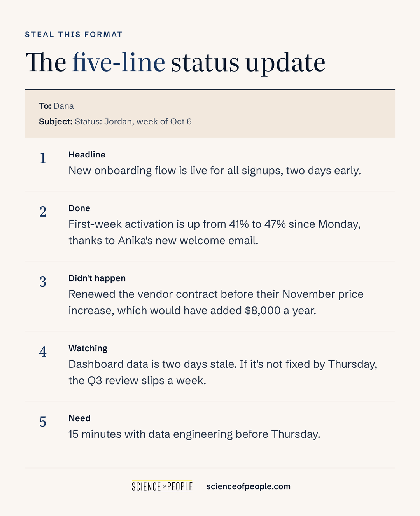
Hi Marty! Here’s my week:
Headline: New onboarding flow is live for all signups, two days early.
Done: First-week activation is up from 41% to 47% since Monday, thanks to Anika’s new welcome email.
Didn’t happen: Renewed the vendor contract before their November price increase, which would have added $8,000 a year.
Watching: Dashboard data is two days stale. If it’s not fixed by Thursday, the Q3 review slips a week.
Need: 15 minutes with data engineering before Thursday.
Which one could you copy a line from, word for word?
The second one, right? It’s about the same length as the first, but what’s different is that every line is specific. Long and vague also tends to get skipped.
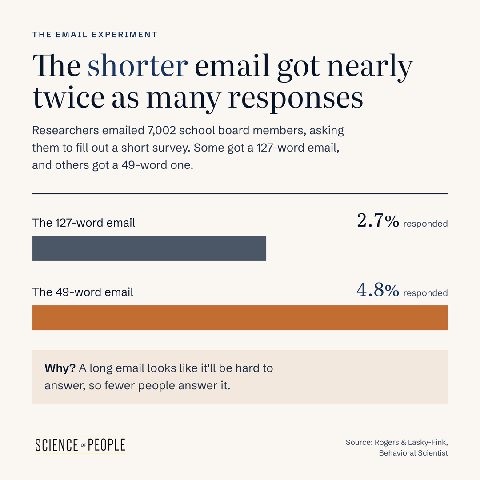
When researchers emailed 7,002 school board members, a 49-word request was responded to nearly twice as much as a 127-word request: 4.8% against 2.7%.2 Readers often take a long message as a sign it’ll be hard to respond to!
We like the five-line format partly because it fits on a phone screen:
- Headline. The one sentence you’d want repeated in a meeting you’re not in.
- Done. What finished, with a number attached.
- Didn’t happen. A problem you headed off (more on this below).
- Watching. Anything at risk, with the date it becomes a real problem.
- Need. One specific ask, or “nothing this week.”
Write Every Update Like It’ll Be Forwarded
Your update might have a second reader. On a bigger team, that’s often your manager’s boss, or on a small team, it might be the founder or a client.
Whoever it is… they won’t know what “the Q3 thing” means. So write every update so it makes sense to a stranger:
- Spell out names and acronyms once. “The CSAT dashboard” becomes “the customer satisfaction dashboard” the first time.
- Cut the inside references. “Per our chat” and “the thing from Tuesday” mean nothing two inboxes later.
- Name teammates and what they did. “Anika rebuilt the test suite, which is why we shipped two days early.”
Crediting someone by name makes the update more accurate, and it shows you notice other people’s work. (If sharing your own wins still feels like bragging, talking about yourself without bragging walks through it.)
Pro Tip Use the same subject line every week, like “Status: Brian, week of Oct 6.” Come review season, someone will be trying to remember what you did back in April. One search pulls up every update! (We’re big fans of boring subject lines for exactly this reason.)
Want more ways to get a busy person to read your email? Watch our video below for seven tips, including why your most important idea belongs at the top:

A new book by Vanessa Van Edwards
Every conversation is an opportunity.
If conversations have gotten harder, more awkward or less satisfying, you’re not imagining it. We’re simply out of practice. It’s time to find the joy in talking to each other again.
Name Your Progress (Even Tiny Progress!)
“Migration: in progress” is vague. “Migration: 31 of 40 accounts moved” tells them you’re nearly done and it’s going fine.
So put a number on your progress, even when it feels too small to mention.
Managers tend to underrate progress that small. Only about 5% of managers in one survey ranked supporting progress as the top motivator (and most ranked it dead last!). Yet in a separate diary study, some step forward happened on 76% of people’s best-mood days.3
Funny, right?
Writing the numbers down helps you, too. Six months of “31 of 40” lines is a LOT easier to bring to a review than a vague memory of being busy. (That’s where an impact log comes in handy.)
Report the Fire (That Never Started…)
Remember Y2K? For years, programmers combed through old code so computers wouldn’t break when the calendar flipped to 2000. Large businesses in the U.S. spent an estimated $100 billion on the fix.
Then January 1, 2000, arrived… and the crisis never came.
You’d think everyone would celebrate. Instead, in TIME’s words, Y2K “morphed into a punch line, as relief gave way to derision.”4 People called it a big hoax and the fix a waste of time. As one engineer at an auto company put it, “Nobody ever gets credit for fixing problems that never happened.”5
To get credit for a non-event, you have to write it down.
A good one has three parts: what you did, what it stopped, and what that would have cost.
- “Caught a duplicate charge on the Acme invoice before it posted. That would have been a $12,000 refund conversation with their CFO.”
- “Moved the launch email off Thanksgiving weekend, when the client’s whole team is out of office. Every reply would have sat unanswered for four days.”
- “Renewed the API key a week before it expired. Otherwise checkout goes down for every customer.”
When did you last mention a problem that never happened? (Hint: they’re WAY harder to remember than the fires.)
Try This: Make a note on your phone called “Didn’t happen.” Every time you catch something before it breaks, add one line. On Friday, pick the best one for your update!
Send the Bad News While It’s Still Yellow
Waiting until a problem is fixed is SO tempting! In one set of interviews, most employees could recall keeping a work concern from their boss. The most common reason? Fear of being seen in a negative light.6 (At one firm, the weekly progress meeting was even nicknamed “the liars’ club.”5)
So flag it while it’s still yellow. Remember the stale dashboard from your Friday update? Here’s that Watching line written out in full:
Watching: The dashboard is yellow. It’s two days stale, and nobody has found the cause yet. If it isn’t fixed by Thursday, the Q3 review slips a week. Backup plan: I pull last quarter’s numbers by hand, and I’ll make the call Thursday morning.
That’s bad news, and it still sounds like someone who has the situation in hand. Marty gets four working days to help instead of an apology on Friday.
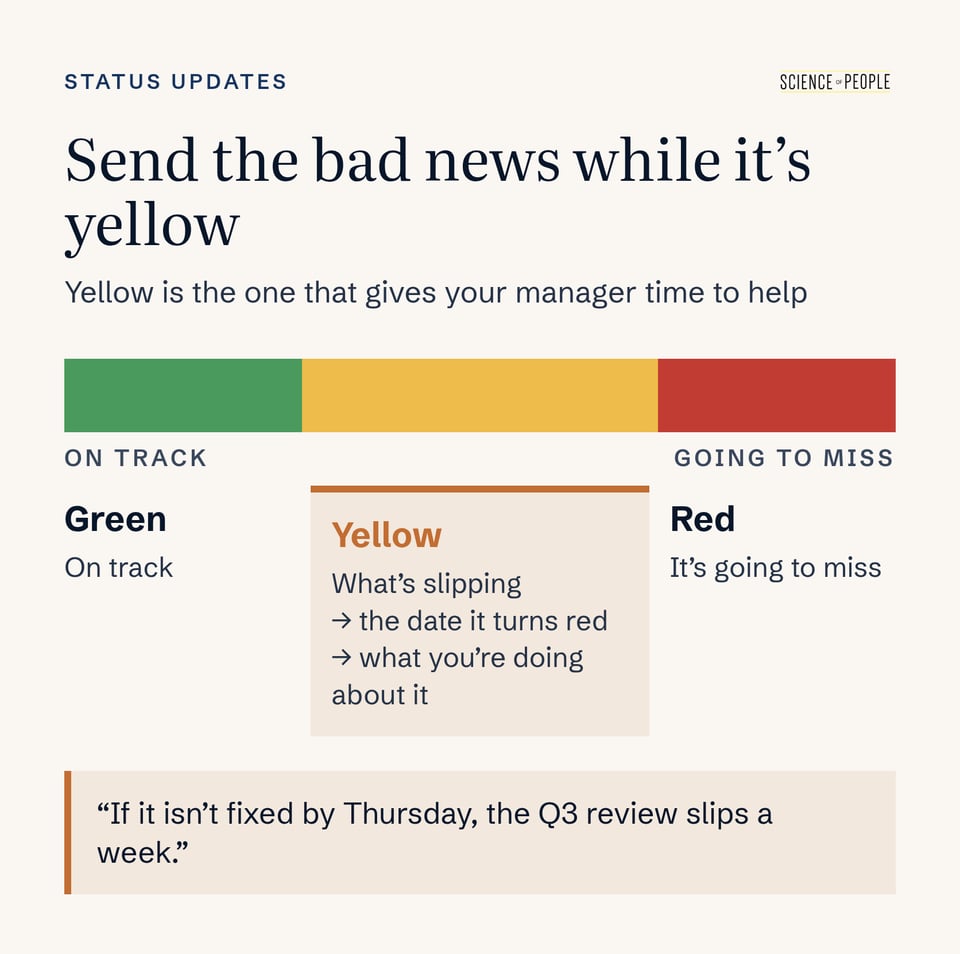
The colors come from a traffic light. Green means on track, and red means it’s going to miss.
Yellow is the useful one—it means “at risk, and here’s the date it turns red.” A yellow line names what’s slipping, the date it becomes a real problem, and what you’re doing about it.
Send One More Line on Thursday
Say Thursday morning arrives and the dashboard is still stale. Send one more line before lunch, so nobody has to ask:
Update: The dashboard is still stale, so I’m switching to the backup. I’ll have last quarter’s numbers pulled by hand by Friday noon, and the Q3 review stays on schedule.
And if the backup works? The problem you flagged last Friday becomes tomorrow’s “Didn’t happen” line:
Didn’t happen: Pulled last quarter’s numbers by hand when the dashboard broke, so the Q3 review stayed on schedule instead of slipping a week.
Want the in-person version of this conversation? It’s all in how to deliver bad news.
Ask Your Manager What They Actually Read
The five lines are a starting point. Does your manager want more detail, or way less? The quickest way to find out is to ask them once.
You might ask it in your next one-on-one, in words like these:
“When you read my Friday update, which part do you use most? I’d like to make it more useful for you.”
Over the next few weeks, notice which lines get a reply or a follow-up question. Those are the lines your manager is using.
Here’s how the format can flex:
| If your manager… | Try this |
|---|---|
| Replies to every detail with a follow-up question | Keep the five lines on top, then add a short “Details” section underneath for anyone who wants to dig in. |
| Only ever reacts to the headline | Send the headline, your best “Didn’t happen” line, and the Need line, and link to a doc with everything else. |
| Lives in Slack instead of email | Post the same five lines as one message, starting with your subject line, so one search still pulls up every update. |
Whatever you change, keep the headline first.
And if no line ever gets a reply? A better update won’t fix a manager who doesn’t read them. The signs are usually clear: no replies, and questions in your one-on-ones that your last three updates already answered.
At that point, take the five lines into the one-on-one itself and read the headline out loud. It’s slower—and with some managers, even that won’t stick.
No update habit on your team yet? You don’t need permission to start one. A quick heads-up keeps the first one from coming out of nowhere:
“Starting this week, I’ll send a five-line update every Friday, so you always know where my projects stand. Tell me anytime if you want more or less!”
What If This Week Was All Heads-Down Work?
Send it anyway! We’d take a one-liner over a skipped week every time.
Headline: Heads-down on the pricing model. First draft to you Thursday.
A skipped week leaves a blank… and other people fill blanks in for you. A one-liner keeps the habit going and tells your manager exactly when to expect something real.
Frequently Asked Questions (FAQs) About Status Updates
What should a weekly status update include?
A weekly status update works best as five short lines: Headline, Done, Didn’t happen, Watching and Need. The headline is the one sentence you’d want repeated in a meeting you’re not in. Done gets a number. Didn’t happen is a problem you headed off. Watching names a risk and its date. Need is one specific ask, or “nothing this week.”
How long should a status update be?
Keep it short enough to fit on a phone screen. Shorter messages tend to get more replies, and a long, vague update is easy to skip. Five specific lines usually take up about the same space as one rambling paragraph, but your manager can copy any of them word for word. If they want more, add a short “Details” section underneath.
How do I make my work visible to my manager without bragging?
Report specific results and credit the people who helped. “Anika rebuilt the test suite, which is why we shipped two days early” is accurate, generous and visible all at once. Put a number on every Done line, like “31 of 40 accounts moved.” Then add one “Didn’t happen” line for a problem you caught. Those specifics give your manager information they can reuse in a meeting you’re not in.
How do I get credit for problems I prevented?
Write them down, because nobody notices a fire that never started. A good “Didn’t happen” line has three parts: what you did, what it stopped and what that would have cost. For example: “Caught a duplicate charge on the Acme invoice before it posted. That would have been a $12,000 refund conversation with their CFO.” Keep a phone note of these all week and pick the best one on Friday.
When should I tell my manager about a problem?
Tell them while it’s still yellow, before it turns red. A yellow line names what’s slipping, the date it becomes a real problem and your backup plan. “If it isn’t fixed by Thursday, the Q3 review slips a week. Backup plan: I pull last quarter’s numbers by hand.” Flagging early gives your manager days to help instead of an apology on Friday.
What does yellow mean in a status update?
Yellow means “at risk, and here’s the date it turns red.” Green means on track and red means it’s going to miss, but yellow is the most useful color because there’s still time to act. Every yellow line should say what’s slipping, when it becomes a real problem and what you’re doing about it. Follow up with one more line if the situation changes.
What subject line should I use for a weekly update?
Use the same boring subject line every week, like “Status: Brian, week of Oct 6.” A consistent subject means one search pulls up every update you’ve sent. That’s handy at review season, when you or your manager are trying to remember what you did back in April. If your team works in Slack, start the message with the same line.
What if my manager doesn't read my status updates?
Ask once which part they use, and if nothing changes, bring the update into your one-on-one. Try: “When you read my Friday update, which part do you use most?” Watch which lines get replies. If none ever do, and they ask questions your updates already answered, read the headline out loud in your next one-on-one instead of relying on email.
Should I send a status update if I didn't finish anything this week?
Yes, send a one-liner instead of skipping the week. “Heads-down on the pricing model. First draft to you Thursday.” A skipped week leaves a blank that other people fill in for you. One line keeps the habit going and tells your manager exactly when to expect something real. Keep the same subject line so it still shows up in the search.
Status Update Takeaway
Here’s the whole format on one card, ready to screenshot:
- Cut your next update to five lines, headline first. Make the headline one sentence your manager could paste straight into their own notes.
- Put a number on your Done line. “31 of 40” beats “in progress,” even when the number feels small.
- Add one “Didn’t happen” line this week. Pick a problem you caught before it broke, and say what it would have cost.
- Flag anything yellow now. Name the date it turns red and your backup plan.
- Credit one teammate by name. Say what they did and what it made possible.
- Use the same subject line every week, so every update is one search away at review time.
- Ask your manager once which line they use most. Their answer tells you what to trim.
Once your updates are going out, the next skill is reading what your boss needs from you on a given day. That’s exactly what managing up covers.