Let’s say you’re on a video call, but there’s a teeny tiny problem… There are twelve muted squares (half of them with the camera off), and just one person talking. Have you ever been that person? It’s a bit like telling a joke into a pillow.
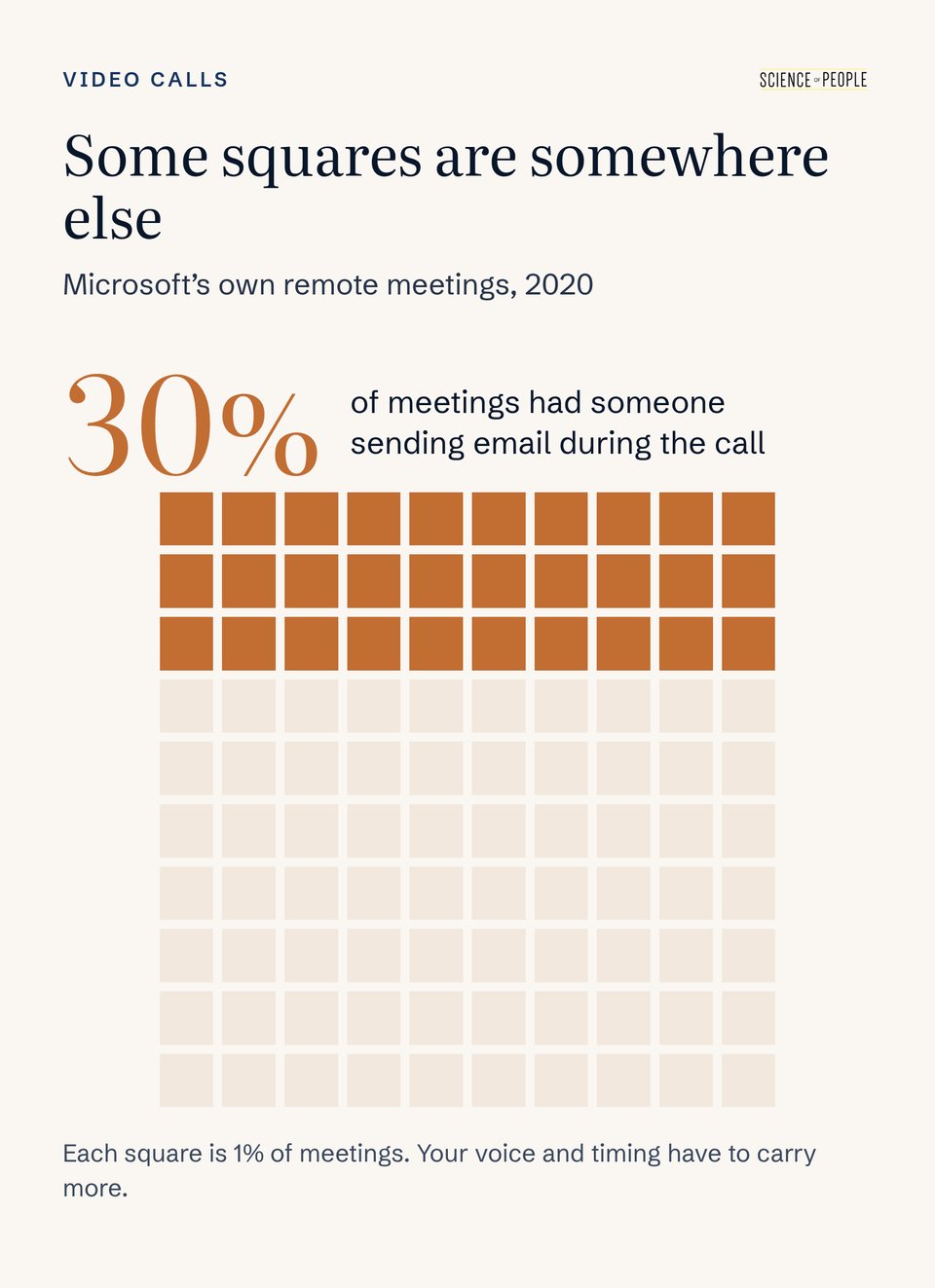
And some of those squares really are somewhere else. When researchers looked at Microsoft’s own meetings in 2020, about 30% of them had someone sending email while the meeting was going on.1 (And that’s at a company that makes meeting software.)
Even the people with cameras on are looking at a grid of tiny faces (and their inbox), so a lot of what your face and hands would do in a room has to come through your voice and your timing.
Answer Before the Delay Answers for You
Here’s a fun question for you: in person, the gap between one person finishing and the next person starting is a fraction of a second. How much longer do you think that gap gets over Zoom?
a. About the same
b. Roughly twice as long
c. More than three times as long
If you picked c, you’re right! In one set of conversations, turn changes took about 135 milliseconds face to face and about 487 milliseconds over Zoom.2 That’s far more than the connection lag alone would explain.
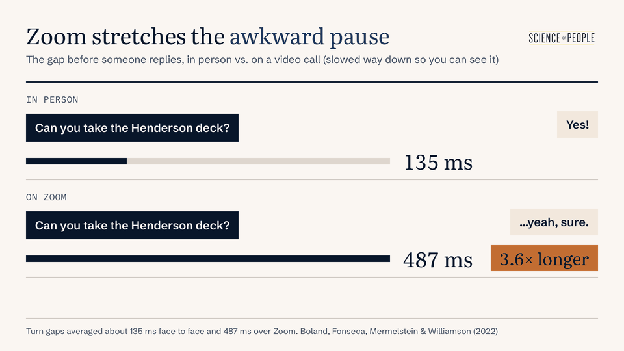
That stretched gap changes how your answer sounds. When listeners heard simulated phone calls between friends, every extra stretch of silence before a “yeah” or a “sure” made the answer sound less willing. Agreement sounded weaker too.3
Zoom calls = longer pauses. There’s no way around it, unfortunately (for now).
Here are four ways to get ahead of it:
- Don’t add your own pause to the lag. “Yes. I’ll have it to you Thursday.” A clean yes with a day attached leaves less room to hear doubt than “…yeah, sure” does.
- If you need a second, say so. “Good question, let me check the calendar.” A spoken placeholder tells them you’re thinking, so the quiet doesn’t sound like reluctance. (If your mind goes completely blank, we cover what to do in why your mind goes blank.)
- Disagree in words. If the answer is no, “I see it a little differently” said right away beats a long pause they have to interpret.
- When you’re the one asking, wait longer. The delay goes both ways. Count to three in your head before you rescue your own question.
Answer faster on a laggy line and you’ll sometimes start talking at the exact moment someone else does. There’s no clean fix for that. A quick “Sorry, go ahead” and a beat of awkwardness are the price.
Count Your Points Out Loud
In a conference room, people can tell how long you’re going to talk. They can count the bullets on your slide, or see you gathering your notes as you wrap up. BUT on a call… they have no idea if you’ll talk for 20 seconds or twenty minutes!
Try This: Next time you give an update, tell people up front how much is coming. Something like, “I’ve got two things, and I’ll need a decision from Sam on the second one.” Say “first” and “second” out loud as you go, so nobody has to guess where you are. And when you’re done, say “That’s it from me.”
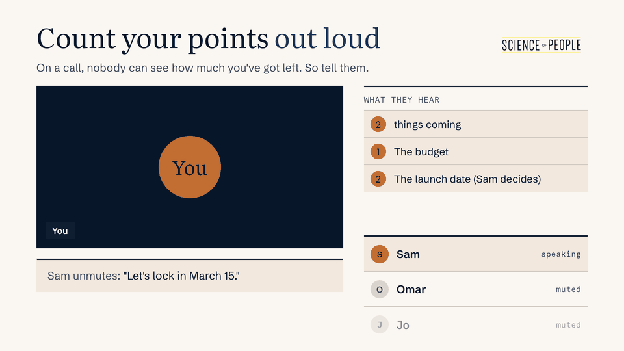
It sounds almost too simple, but it works on a call.
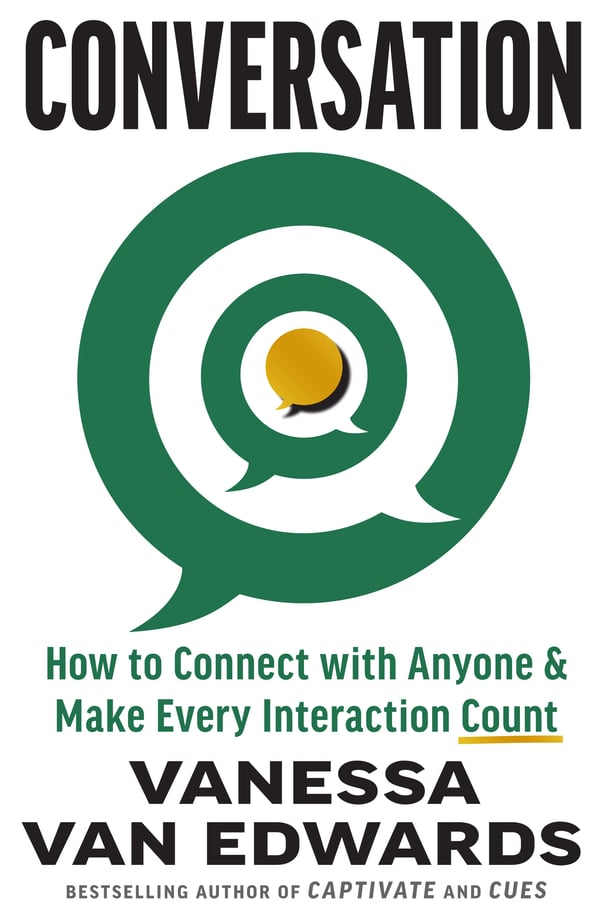
A new book by Vanessa Van Edwards
Every conversation is an opportunity.
If conversations have gotten harder, more awkward or less satisfying, you’re not imagining it. We’re simply out of practice. It’s time to find the joy in talking to each other again.
Make Your Listening Audible
Listening can be hard… especially on calls. When listeners in one study were distracted from a story, they responded less, especially with specific reactions like wincing. The people telling the story told it noticeably worse, most of all at what should have been the big ending.4
On a muted call, even the “mm” is gone.
- Unmute for the reaction. A quick “Oh no” or “Mm, that’s a good catch” when someone shares something, then mute again. That’s one second of valuable airtime!
- Make one reaction specific. “Wait, the Friday release?” shows you caught the detail.
- Use reactions as your nod. A thumbs-up while someone presents is the call’s version of a nod, and it doesn’t interrupt anybody.
There’s more on the listening side in listening skills.
Learn to Disagree (The Right Way)
If you’re conflict-avoidant, maybe you’ve typed “That won’t work for next week” into the meeting chat while your coworker pitches a plan you’re sure will flop… and you don’t quite send it. And while you’re trying to find your perfect pushback, everyone else agrees and it’s too late.
Sound familiar?
But science says disagreement can work. When people heard someone explain a view they disagreed with, they saw that person as more thoughtful and more mentally capable.5
Okay, you might be wondering if chat has any place on the call. It does, for links and quick “+1”s. For a disagreement you actually care about, you might be better off unmuting and trying something like:
“Can I flag one thing on timing? Next week during book launch is when the team is already stretched. Could we look at November instead?”
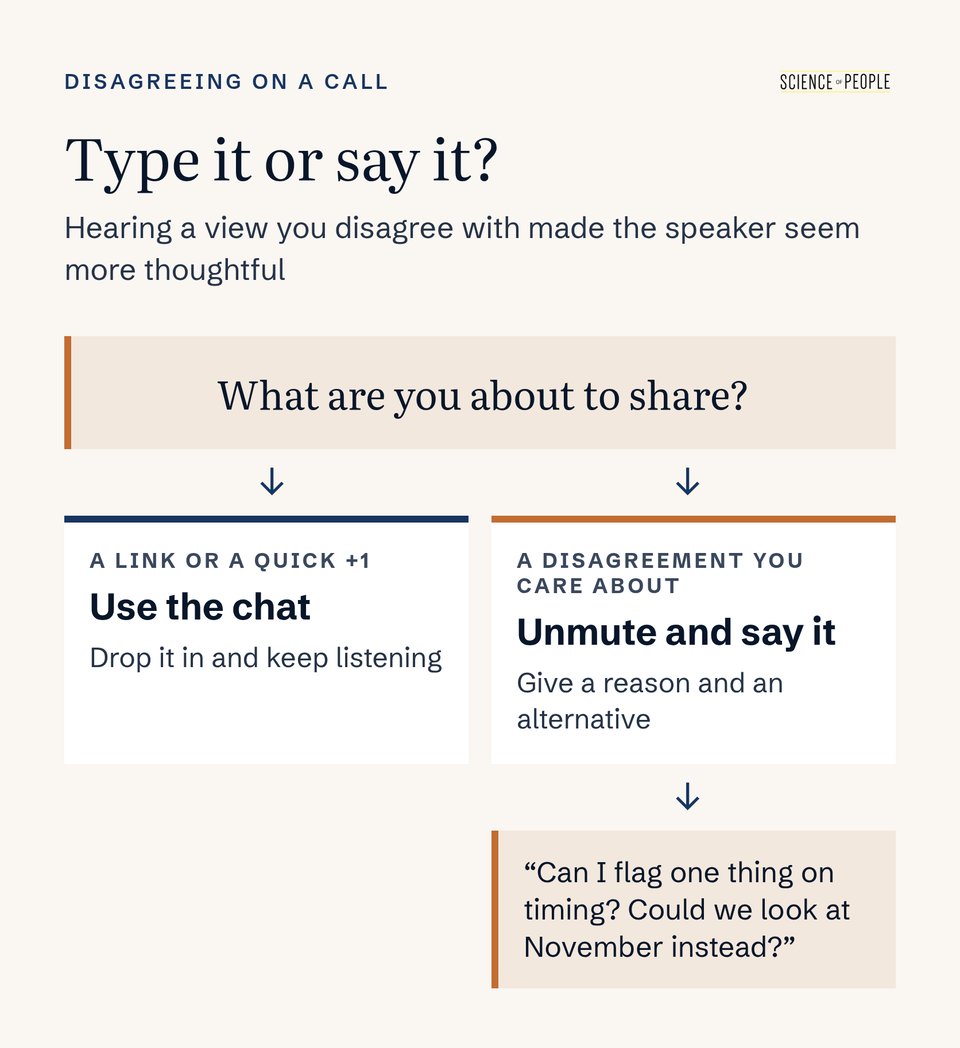
Said out loud, it sounds like someone trying to help the plan work.
If the hard part is getting a word in at all, how to speak up in meetings has the scripts.
Sort Out Your Sound
Got sound issues? Here are some pro tips to make sure you don’t have an awkward “Can you hear me?” moment.
- Hear yourself the way everyone else does. You’re the one person on the call who can’t hear how you sound. In a 2025 Yale study, recordings made to sound “tinny,” like a cheap mic, made speakers seem less intelligent, less hireable, and less credible, even though listeners understood the words just as well.6 So before a call that matters, run a test call. Teams has “Make a test call,” and Zoom’s “Test Mic” plays your voice back.
- Get the mic close to your mouth. In another study, people heard the same talks and radio interviews in good or poor audio. With poor audio, they rated both the researcher and the research less favorably.7 A headset or earbud mic near your mouth picks up your voice and less of the room, so it beats a laptop mic across the desk.
- Hold the spacebar to talk. Turn on Zoom’s push-to-talk setting, and holding the spacebar unmutes you until you let go. In the Teams desktop app, it’s Ctrl+Space (Option+Space on a Mac). You can jump in the second you have something to say, without fumbling for the button… and your dog’s opinions about the delivery driver stay off the call.
For the on-camera side of video calls, Zoom etiquette covers that, too!
Frequently Asked Questions (FAQs) About Holding a Room on a Video Call
How do I keep people's attention on a video call when cameras are off?
Let your voice and timing do the work your face and hands would do in a room. Tell people up front how many points you have, say “first” and “second” as you go, and close with “That’s it from me.” Answer quickly and cleanly so the lag doesn’t make you sound unsure. When others talk, unmute for a short, specific reaction.
Why do pauses feel longer on Zoom?
The gap between one person finishing and the next person starting gets much longer over video. In one set of conversations it went from about 135 milliseconds face to face to about 487 milliseconds on Zoom, which is more than connection lag alone explains. So the quiet before your reply is already stretched before you add any hesitation of your own.
How do I avoid sounding unsure when I answer on a video call?
Give a clean yes with a day attached, like “Yes. I’ll have it to you Thursday.” A longer pause before “yeah” or “sure” tends to sound less willing, and video calls already stretch that pause. If you need a moment, say so out loud: “Good question, let me check the calendar.” That way the quiet sounds like thinking instead of reluctance.
What should I do if I talk over someone because of lag?
Say a quick “Sorry, go ahead” and let them finish. Answering faster on a laggy line means you’ll sometimes start at the exact moment someone else does, and there’s no clean fix for that. A beat of awkwardness is the price of not letting the delay speak for you. Once they’re done, come back in with your point.
How do I give a clear update in a virtual meeting?
Announce your count before you start, because nobody on a call can see how much you have left. Try “I’ve got two things, and I’ll need a decision from Sam on the second one.” Say “first” and “second” out loud as you move through them. When you finish, say “That’s it from me” so people know the floor is open.
How can I show I'm listening on a muted call?
Unmute for one short reaction, then mute again. A quick “Oh no” or “Mm, that’s a good catch” takes a second and tells the speaker someone’s with them. Make at least one reaction specific, like “Wait, the Friday release?”, so it’s clear you caught the detail. While someone presents, a thumbs-up reaction works as your nod without interrupting.
Should I disagree in the chat or out loud on a video call?
Say it out loud when it’s a disagreement you actually care about. Hearing someone explain a view you disagree with tends to make them seem more thoughtful than reading the same words. Keep chat for links and quick “+1”s. Unmute and try “Can I flag one thing on timing? Could we look at November instead?” with a reason and an alternative.
Does audio quality matter on video calls?
Yes, it can change how smart you seem. Tinny, cheap-mic audio made speakers seem less intelligent, less hireable and less credible, even when listeners understood every word. Run a test call before calls that matter, using Teams’ “Make a test call” or Zoom’s “Test Mic.” Then move the mic close to your mouth with a headset or earbuds instead of relying on a laptop mic across the desk.
How do I unmute quickly on Zoom or Teams?
Use push-to-talk. In Zoom, turn on the push-to-talk setting, and holding the spacebar unmutes you until you let go. In the Teams desktop app, it’s Ctrl+Space, or Option+Space on a Mac. You can jump in the second you have something to say without hunting for the button, and background noise stays off the call the rest of the time.
Video Call Takeaway
Pick one of these for your next call:
- Start your next question with a name and one sentence of context, then ask it.
- Give a clean yes with a day attached the next time you agree to something: “Yes. I’ll have it to you Thursday.”
- Announce your count before you talk for more than a minute: how many points, and who needs to decide.
- Unmute once while someone else presents, for a reaction that shows you caught a detail.
- Say the disagreement out loud the next time you’d type it, with a reason and an alternative.
- Put on the headset and say your first line out loud before you click join.
And if the problem on your calls is other people steamrolling you once you do speak, what to do when you’re talked over in meetings is the next read.