“Wait, what did I do in the last 6 months?”
That’s the feeling software engineer Julia Evans gets every performance review season, she wrote on her blog. She did the work, but had just forgotten “what cool stuff [she] actually did.”
Her solution is a brag document. The first time she shared one with her manager, she was nervous. It felt weird to hand over “a long document listing everything.”
But her manager was really thankful for it! Why? Because now he could write her review from the page “instead of trying to remember what happened.”
Here’s how to build one before your next review!
What Is a Brag Document?
A brag document is a running record of a person’s work accomplishments, updated throughout the year and used to prepare for performance reviews, promotion cases, raise requests, and job applications. It’s also known as a brag file, a wins file, a work log, or an accomplishments list.
Despite the name, nobody has to see the full list. Bragging happens out loud, in a meeting or a LinkedIn post. A brag document is the notebook behind all of that (and you decide which pages anyone else EVER reads).
So when you do want to talk about yourself without bragging, this is where the material comes from!
Why You Can’t Wing It at Review Time
On an episode of his Netflix series The Chef Show, Jon Favreau brought up the time he and Gwyneth Paltrow were in Spider-Man: Homecoming together.
She insisted they weren’t.1 She’d played Pepper Potts in several Marvel movies, and this one, a single short scene, had slipped her mind completely. Then Favreau described the scene… the press conference at the end, with Tom Holland right there.
“That was Spider-Man?”
If a movie star can forget she was in a Marvel movie, you can definitely forget the project issue you fixed back in March. And winging it at review time costs you big time:
- You’ll lose more of the year than you think. A psychologist who logged his own daily life for six years later couldn’t retrieve as many as one in five of those events, even with his own notes as prompts.2
- Your manager rates what they see. In one study of office workers, simply being seen at work made people seem more dependable and committed… and the observers didn’t realize they were judging.3 A lot of your best work happens where your manager can’t see it.
- Your rating bends to the rater. In one large study of managers, the raters’ own quirks shaped the ratings more than the actual work did.4
- Vague claims sound less true. In a series of experiments, the exact same statement was judged more likely to be true when it was written in concrete words.5 “I worked really hard on the launch” is as vague as it gets.
So if you get good feedback all year and a lukewarm review anyway, your work may not be the problem. The evidence just never made it into the room.

A new book by Vanessa Van Edwards
Every conversation is an opportunity.
If conversations have gotten harder, more awkward or less satisfying, you’re not imagining it. We’re simply out of practice. It’s time to find the joy in talking to each other again.
Set It Up This Week
Setup takes three steps:
- Choose one home for it. A phone note, a doc, or a spreadsheet all work. I prefer using a spreadsheet since I can pull it up on my laptop or phone anytime.
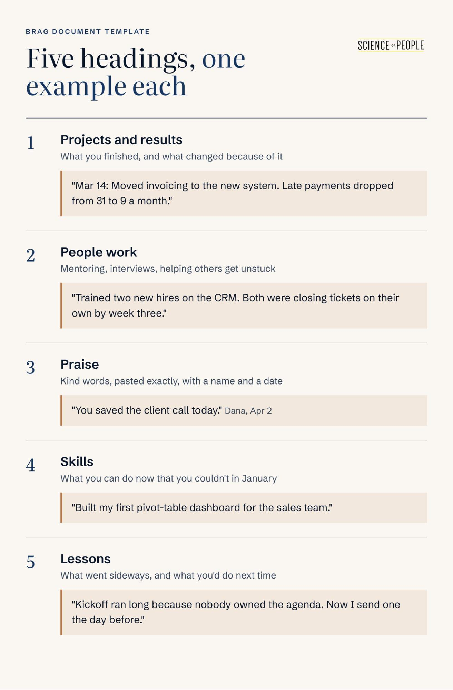
- Add five headings. Here they are below, with an example entry for each.
- Backfill the last three months. Scroll your calendar and your sent folder week by week. Every launch meeting, long email thread, and “thank you SO much!!” reply is a possible entry. (New in the role? Start with this week!)
How to Write Entries You’ll Actually Use
Swap Every Adjective for a Number
“Did a great job on the Q3 launch.”
Six months from now, this tells you… almost nothing! Great, but how? Compared to what?
A specific number gives your manager something besides your words to go on:
| Vague entry | Specific entry |
|---|---|
| “Helped with the Q3 launch.” | “Wrote the launch FAQ. Support got 12 tickets in launch week, down from 45 in the spring launch week.” |
| “Improved onboarding.” | “Turned new-hire setup into a one-day checklist. Used by 14 new hires since May.” |
| “Clients liked my work.” | “Client renewed for two years and asked for me by name on the kickoff call.” |
No number handy? You can count something nearby: hours, days, dollars, tickets, pages, or people. Even a rough count (“about 20 hours saved”) beats “a lot.”
Write Down the “Before”
“Dropped to 9” leaves people guessing. “Late payments dropped from 31 to 9 a month” shows them how big the change was!
The “before” is easiest to grab on day one of a project. Six months later, the old dashboard has been deleted and it’s hard to remember what the numbers used to be.
Try This: The next time you’re handed a project, add one line before you start. “Apr 3: Starting the returns cleanup. Today there are 220 open returns, and the oldest is 47 days old.”
Screenshot the Praise the Day You Get It
By review season, the “you saved this launch” email is buried under thousands of others. (Ask me how I know.)
Kind words go into the Praise section EXACTLY as written, with the person’s name and the date. A screenshot works too.
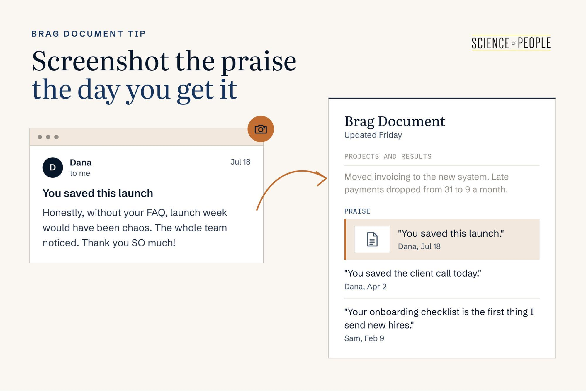
On a rough week, rereading the Praise section can be a quick self-worth boost.
Log the People Work
Some of your most valuable weeks might not even produce a single deliverable (I’ve been there!). Maybe you sat on four interview panels, walked a new hire through the codebase, and talked a frustrated client down on a Friday call.
There’s no golden ticket number for this kind of work… so it rarely makes it into a brag document.
So here’s what to do. “People work” gets its own heading. Write each entry as an outcome: “Mentored a new analyst, who was running the monthly report on their own by week six.”
If that heading fills up much faster than Projects, you may be doing a lot of work that doesn’t get you promoted. Better to spot it in June than in December!
Count the Small Wins, Too!
Not every entry needs to be a launch. “Finally figured out why the export kept failing!” counts. So does “Got the client to reply after three weeks of silence.”
A small-wins line helps at review time, and again on a Thursday when it feels like you got nothing done. (You probably did.)
Add One Line on What You Learned
Lessons belong here too, including the ones from projects that went sideways. Start with what happened (“The kickoff ran long because nobody owned the agenda”), then add what you changed (“so I started sending agendas the day before”).
That second part is usually the part a manager cares about most. It shows you noticing a problem and fixing it without being asked. And when a review form asks what you’d do differently… you already have the answer!
Keep It Alive With a Five-Minute Friday
A brag document tends to collect dust after you start it, then never come up again. (Mine did.) A tiny habit with a fixed time slot keeps it going:
- Set a recurring five-minute reminder for Friday afternoon.
- Answer three questions. What did I finish? Who did I help? What did someone say about my work?
- Skim the month on the last Friday. Bold the one or two entries you’d want your manager to hear about.
Want to start right now? Think about this week.
What’s one thing you finished that nobody else knows about?
Write it down: ________
Missed a Friday? Two lines the following week is plenty!
Turn It Into Your Self-Review
A 40-line list can swamp a busy manager… so before you send anything, trim it to one page.
- Pull up the review criteria. That might be your company’s rubric, your career ladder, or last year’s goals.
- Pick three to five stories that match them. Each one gets a before, an after, and a number.
- Write a one-page summary. Send it to your manager about two weeks before reviews are due, so they have it while they’re writing. The full document stays private.
Here’s what that one page might look like:
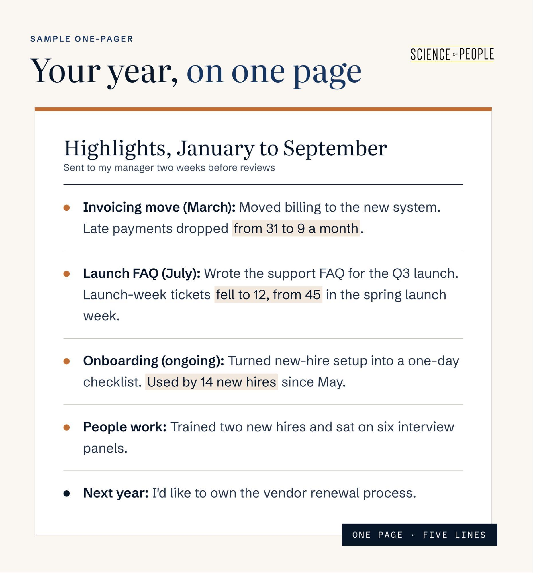
Your manager can lift those lines straight into your review! And if a raise is on the table, the same page goes into your raise request.
Walk Your Manager Through It
The one-pager gets your work onto paper. Your next one-on-one gets it into your manager’s head… and it’s the easiest part to rush, because talking about your own wins out loud can feel awkward.
So script the first lines. Ten minutes is plenty.
Say why you’re bringing it. A summary that shows up without warning can feel like a pitch. Name the purpose first:
“Before reviews, I put together a one-page summary of my year. Can I walk you through my top three in 10 minutes?”
Lead with the result, then the “before.” Your manager hears the point first, and the backstory makes it bigger:
“Late payments are down to 9 a month. When I took over invoicing in March, they were at 31.”
Name who helped. It’s accurate, and it keeps the story about the work:
“Sam and I rebuilt the reminder emails together. That’s what moved the number.”
End with a question about next year. This turns a look back into a plan:
“What would you need to see from me this year to be ready for the next level?”
Write their answer down. It’s the first entry in next year’s brag document!
Frequently Asked Questions (FAQs) About Brag Documents
What should I put in a brag document?
Put in anything you’d want your manager to remember at review time, sorted under five headings: Projects and results, People work, Praise, Skills and Lessons. Projects get a number and a “before.” Praise goes in word for word with a name and date. People work covers mentoring, interviews and helping others get unstuck. Small wins count too, like finally fixing a failing export.
Is a brag document the same as bragging?
No. Bragging happens out loud, in a meeting or a post, while a brag document is the private notebook behind it. Nobody has to see the full list, and you decide which entries anyone else ever reads. When review season comes, you pull the best three to five stories into a one-page summary and keep the rest to yourself.
Where should I keep my brag document?
Pick one home and stick with it, whether that’s a phone note, a doc or a spreadsheet. A spreadsheet is handy because you can open it on your laptop or phone anytime. Name it “Brag Document,” add the five headings, then scroll back through your calendar and sent folder for the last three months to backfill your first entries.
How do I write a strong brag document entry?
Swap the adjective for a number and include where things started. “Helped with the Q3 launch” tells your future self almost nothing. “Wrote the launch FAQ. Support got 12 tickets in launch week, down from 45 in the spring launch week” shows the size of the change. If there’s no obvious metric, count something nearby, like hours, tickets, pages or people.
How often should I update a brag document?
Update it for five minutes every Friday afternoon. Set a recurring reminder and answer three questions: What did I finish? Who did I help? What did someone say about my work? On the last Friday of the month, skim the month and bold the one or two entries you’d want your manager to hear about. Missed a week? Two lines the next Friday is plenty.
How do I track work that doesn't have a number, like mentoring?
Give people work its own heading and write each entry as an outcome. For example: “Mentored a new analyst, who was running the monthly report on their own by week six.” Interview panels, onboarding help and calming down a frustrated client all belong here. If this section fills much faster than Projects, that’s a useful early signal about where your time is going.
How do I turn a brag document into a self-review?
Trim it to one page that matches what you’re being reviewed on. Pull up the rubric, career ladder or last year’s goals, then pick three to five stories that fit. Give each one a before, an after and a number. Send the page to your manager about two weeks before reviews are due, and keep the full document private.
How do I talk to my manager about my brag document?
Bring it to a one-on-one and name the purpose up front. Try: “Before reviews, I put together a one-page summary of my year. Can I walk you through my top three in 10 minutes?” Lead each story with the result, then the starting point, and name who helped. Finish by asking what they’d need to see from you to be ready for the next level.
What if I'm new and don't have much to put in it yet?
Start with this week. Log one thing you finished, one person you helped and any kind words you got, even if they seem small. When you’re handed your first project, write down the starting numbers on day one, like “220 open returns, the oldest 47 days old.” Those “before” figures are hardest to find later and make every future entry stronger.
Brag Document Takeaway
- Open a note called “Brag Document” today and add the five section headings.
- Block time this week to scroll your calendar and sent folder from the last three months, and log every win you find.
- Put a five-minute reminder on your calendar for every Friday afternoon.
- The next time someone praises your work in writing, paste their exact words into the Praise section with their name and the date.
- Two weeks before your next review, trim the document to one page and send it to your manager.
- In your next one-on-one, walk through your top three stories, results first, and ask what they’d need to see for the next level.
The list covers review season. For the rest of the year, here’s how to get credit for your work while it’s happening.