Ugh…another email.
If that’s the thought when your inbox pings, you have company. The average office worker now receives about 121 emails a day,1 and worldwide email traffic is projected to reach about 393 billion messages a day in 2026.2
That’s a LOT of faceless black text on white screens.
People talked face-to-face for many thousands of years before anyone wrote a word down. Even after the printing press arrived, about 580 years ago, reading stayed rare. Two centuries ago, only about one in 10 people in the world could read and write!3
For the vast majority of human history, communication was voice-to-voice and face-to-face. Video emails offer a way to bring the human element back.
If you’ve read my book Captivate, you already know how much of any conversation lives in the channel email throws away — the eyebrow flash, the pause, the warmth in a voice. A video email puts some of it back.
This article was originally co-written with Ethan Beute, then Chief Evangelist at BombBomb and co-author of Rehumanize Your Business. The content below is platform-agnostic and reflects Science of People’s independent editorial standards.

What Is a Video Email?
A video email is an email that includes video content, typically through a clickable thumbnail image that links to a hosted video rather than an attached file. When the recipient clicks the thumbnail, they watch the video on a landing page or video player. Video emails combine the convenience of email with the personal touch of face-to-face communication, letting recipients see your face, hear your tone, and read your body language.
Why Video Emails Work: The Brain Science
Your Inbox Puts Your Brain in a Bad Mood
In a neuroscience study, business professionals wore brain and body sensors while they read their way through a set of emails. Scrolling through text-based emails left them upset or annoyed. Reading text also left them more fatigued than watching video did.
Then a video email appeared in the same inbox, and their mood swung the other way. Recipients moved into what researchers described as a “happy, pleased, or alert” state.4 Video acted as a pattern interrupt, a quick break from decoding walls of text.
One video email moved readers from upset and tired to happy and alert.
We Remember What We See
How many emails from yesterday could you describe right now? Most email is forgotten FAST. In that same study, nearly 60% of participants couldn’t recall a single email two days later.4
Video did better. Details from a video email stuck with 59% of people, compared with 46% for a text email.5 That fits the Cognitive Theory of Multimedia Learning: people take in words and images through separate channels, so pairing them gives a message two ways in.6 So if a detail has to stick (a deadline, a price, a next step), saying it on camera gives it a better shot!
Nonverbal Cues Drive Trust
Say you asked 10 strangers to fill out a questionnaire. How many would say yes?
People in one experiment guessed about half, whether they asked in person or by email. Then they actually asked.
In person, about seven in 10 agreed. Over email, it was…about two in 100 (oof), which made face-to-face requests 34 times more likely to succeed.7
Thirty-four times!
A request from a stranger in plain text tends to look suspicious. The person typing it just can’t feel that from their side of the screen.
So does seeing or hearing the person help, short of being there?
A follow-up study added video calls and phone calls to the mix. Asking in person still won. But a richer channel with a voice or a face beat email, and people again guessed the channel would barely matter.8 (If you’re deciding how to make a big ask, here’s more on when to call or email.)
A video email brings back a lot of what plain text strips away: facial expressions, tone of voice, hand gestures, and the tiny cues that tell someone you mean it.
Through video, your recipients can:
- Read your body language
- Hear your tone of voice
- Experience layers of meaning beyond words
- Better determine what it would be like to work with you
- Accurately gauge your sincerity and conviction
A new book by Vanessa Van Edwards
Every conversation is an opportunity.
If conversations have gotten harder, more awkward or less satisfying, you’re not imagining it. We’re simply out of practice. It’s time to find the joy in talking to each other again.
The Numbers: Do Video Emails Actually Work?
The sales data is hard to ignore, too:
- Teams using video saw a 26% increase in replies and a 16% bump in open rates in a Salesloft analysis of more than 134 million sales emails9
- At HubSpot, reps who added personal video booked meetings at 4x the rate of all their other outreach combined, including calls, emails, and voicemails, according to a case study Vidyard published10

When to Send a Video Instead of Text
Any message that would work best in person, when you can’t stop by someone’s office or book a full meeting, is a video moment. Here are the highest-impact ones:
- Thank-you messages (one of the easiest and most effective uses of video)
- Greetings on holidays and special occasions
- Introductions before appointments and follow-ups after
- Apology notes where tone and sincerity matter
- Project or process updates that are hard to explain in text
- Meeting summaries and next steps
- Complicated explanations that would take paragraphs to type
- Demonstrations of something better seen than described
Pro Tip If you work in an industry with heavy paperwork or a complex system, record one walkthrough video you can reuse. Clients will thank you.
Which of these is on your to-do list this week? Our favorite is the thank-you video.
Each of these situations gives you an opportunity to deliver tone, intent, and body language. From enthusiasm and gratitude to empathy and concern, so much gets lost when you type these messages out.
Any time your message would be better delivered in person but you can’t be there, that’s a video email opportunity.
Why You Can’t Just Attach a Video to an Email
Ever had an email bounce back because the video was too big? (So annoying!) Attaching a video file the way you’d attach a PDF rarely works, and two problems stand in the way:
- File size limits. Gmail caps attachments at 25 MB for personal accounts. The Outlook app caps most personal email accounts at 20 MB, and work accounts vary. A minute of 1080p video from an iPhone runs about 70 to 105 MB, far bigger than either limit.
- Video doesn’t play inside most inboxes. Gmail, Yahoo, Outlook.com, and most versions of Outlook won’t play a video embedded in an email. Apple Mail and a few others can, but you can’t count on your recipient using one (Email on Acid keeps a running list).
So…skip the attachment. The industry-standard workaround is to link a clickable thumbnail to a hosted video:
- Host your video on YouTube (set to “Unlisted”), Google Drive, OneDrive, or a platform like Loom or Vidyard
- Take a screenshot of a compelling frame from your video
- Add a play button overlay using Canva or any simple image editor
- Insert the thumbnail image into your email
- Hyperlink it to your hosted video URL
It looks just like an embedded video, and it works across email clients.
Built-in workarounds:
- Gmail: When you try to attach a file over 25 MB, Gmail automatically uploads it to Google Drive and inserts a link
- Outlook: Offers to upload and share as a OneDrive link for oversized files
- iPhone (Mail Drop): Handles files up to 5 GB by uploading to iCloud and sending a download link that expires in 30 days
How to Send a Video Email: 3 Methods
Method 1: The Quick DIY Approach (Gmail or Outlook)
- Record your video using your phone’s camera or your laptop’s webcam
- Upload to YouTube (set to Unlisted), Google Drive, or OneDrive
- Take a screenshot of an engaging frame where you’re smiling or gesturing
- Open Canva and add a play button overlay to the screenshot
- Compose your email, insert the thumbnail image
- Hyperlink the image to your video URL (Ctrl+K or Cmd+K)
- Type a two-line summary under the thumbnail for anyone who can’t press play
- Add “[VIDEO]” to your subject line
Method 2: Use a Video Email Platform
- Install a browser extension (Loom, Vidyard, Sendspark, or BombBomb)
- Click “Record” directly from your Gmail or Outlook inbox
- Record your webcam, screen, or both
- The platform automatically generates a thumbnail and hosting link
- Paste into your email, and most platforms handle the formatting automatically
- Track who watches, how long they watch, and when they click your CTA
Method 3: Send from iPhone
- Open Photos and select your video
- Tap Share → Mail
- If the file is too large, tap “Use Mail Drop” (handles up to 5 GB via iCloud)
- Alternatively, share via iCloud Link for the highest quality
- Or upload to Google Drive first and share the link

Video Email Platforms Compared
You don’t need a platform to send video emails. The DIY method works fine.
Sending more than a few a week, though? Then a dedicated tool saves time and adds analytics.
| Platform | Best For | Starting Price | Free Option | Key Strength |
|---|---|---|---|---|
| Loom | Quick async updates, internal comms | $18/user/mo | 25 videos, 5-min limit | Fastest recording-to-sending workflow |
| Vidyard | Enterprise sales, CRM integration | $59/seat/mo (billed annually) | 5 videos/mo | Deepest analytics + Salesforce/HubSpot integration |
| Sendspark | High-volume personalized outreach | $49/mo | 7-day trial | AI-powered one-to-many personalization |
| BombBomb | Relationship-based sales | $36/user/mo (billed annually) | Free trial | Unlimited recording, viewer engagement analytics |
Prices checked September 2026 on each company’s pricing page. They change often, so check before you buy.
Key considerations:
- For analytics: Vidyard shows engagement timelines, CTA tracking, and syncs viewer data to your CRM
- For speed: Loom is built around a quick record, copy link, send loop
- For scale: Sendspark lets you record one video and dynamically insert each prospect’s name and company details across hundreds of recipients
- For automation: Most platforms integrate with CRM tools like Salesforce and HubSpot, letting you trigger follow-up sequences based on who watched your video and for how long
AI-Powered Video Email: What’s Changed
The biggest shift in video email is AI personalization across hundreds of recipients at once:
- Sendspark lets you record one video and automatically inserts each prospect’s name and a screenshot of their company website across hundreds of emails
- HeyGen and Synthesia create AI-generated video avatars that can deliver personalized messages in many languages (HeyGen advertises 175+ languages and dialects, Synthesia 160+)
- CRM integration means sales teams can see which prospects watched their videos (and for how long) directly in Salesforce or HubSpot, then trigger automated follow-ups based on engagement
These tools make it possible to get the personal feel of a one-to-one video at the scale of a mass email campaign. The tech is moving fast, but the fundamentals of recording a good video haven’t changed one bit.
How to Record a Great Video Email
Nail Your First 3 Seconds
The opening matters most. Here’s how to make it count:
Eye contact: Look toward the camera rather than at the screen. Your automatic reaction will be to look at your own face or at the preview window. Resist! When you look at the camera, your recipient feels direct eye contact on playback.
Even better, aim a hair below the lens. In one study, people judged a gaze about two degrees below the camera as eye contact more often than a gaze straight into it.11
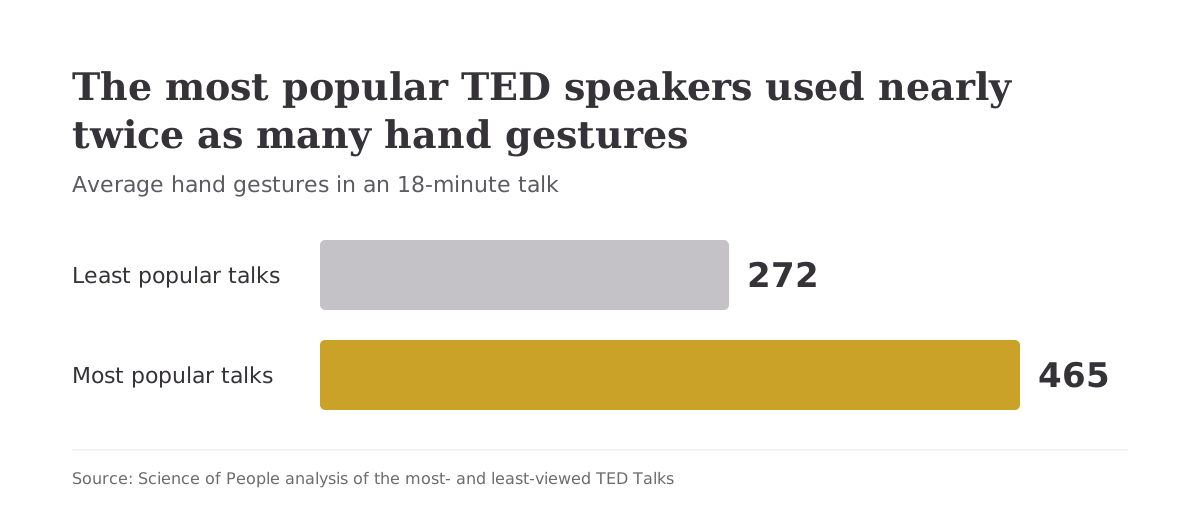
Show your hands: Push the camera back so your torso and hands are visible. When Science of People analyzed TED Talks, the most popular speakers used an average of 465 hand gestures, nearly double the 272 used by the least popular ones!
I also like to start off every video with a wave hello to show my hands first. It’s disarming and signals openness. Hand gestures also make your message easier to understand.12 Want more? That same article walks through 20 specific gestures you can use on camera.
Smile before you hit record: People who smile tend to be seen as more sincere, sociable, and competent.13 Start smiling before you press record, so the first frame your recipient sees is warm and inviting. Some video email tools, including Loom, also turn those first few seconds into an animated thumbnail. That means your smile is what people see in their inbox, too.
A genuine smile tends to crinkle the corners of the eyes, and a posed one often doesn’t.
So don’t paste on a grin. Think of something that genuinely makes you happy right before you record.
Skip the Script
Ever watched someone read a script on camera? It tends to sound like this:
“Hi, Dana. I’m reaching out to…(scrolls)…follow up on our…(scrolls again)…timeline.”
Don’t write a script and read it on camera. Here’s why:
- You’ll break eye contact to glance at your notes
- You’ll focus on getting the words right when you should be connecting with the person
- Your delivery will sound rehearsed
Talk the way you would in person. A stumble or a pause just makes you sound like a REAL person. Nobody speaks in perfect paragraphs in real life.
What to do instead: Before recording, jot down three things: (1) who the video is for, (2) the one or two points you want to make, and (3) your call to action. That’s your entire outline. Then hit record and talk like you’re speaking to a colleague over coffee.
Here’s what that outline might look like on a sticky note after a client meeting:
- Who: Dana, who asked about the timeline
- Point: Launch moves to the 14th, and the budget doesn’t change
- Ask: Reply “yes” and I’ll send the updated contract
We’re big fans of the sticky note. One glance before you press record is usually enough, and then your eyes can stay on the lens.
Talk to One Person
Who’s the one person you’d most like to hear back from this week? When you can, send personal one-to-one videos. Your recipient can see you took the time to record something just for them.
When you need to record for a group or a reusable template, skip the “Hey, everyone…” opener and talk to one specific person from that audience. Each viewer is probably watching alone anyway, so a conversational, one-on-one tone will feel natural.
Pro Tip Weave in a personal detail when possible. Something like, “I saw your team just launched that new product line. Congratulations!” triggers a positive response because it signals you actually pay attention.
Get Your Lighting Right
Where’s the nearest window to your desk right now? You don’t need a lighting kit. You just need to know where the light is and face toward it.
- Best option: Sit facing a window with natural light
- Second best: Position a desk lamp in front of you (not behind you)
- Avoid: Sitting with a bright window behind you, which turns you into a silhouette
- Outdoors: Shoot shortly after sunrise or before sunset for the most flattering light. A little cloud cover actually helps by filtering harsh direct sunlight
You are aiming for a recipient who can clearly see your face and expressions.
Build Your Camera Confidence
One of the biggest hurdles to recording video emails is discomfort with how you look or sound on camera.
If you see yourself on camera and cringe, you’re normal. Most people don’t love how they look in recordings.
But the only person fixating on your appearance is you. Everyone else is too busy worrying about how they look.
When did you last notice a stranger’s crooked collar? In classic experiments on what psychologists call the spotlight effect, people who wore an embarrassing T-shirt in front of others overestimated how many of those observers would remember it.14 Your viewers are paying WAY less attention to your slightly crooked collar than you are!
The voice issue is real too. How you hear your own voice (through bone conduction inside your skull) is physically different from how everyone else hears you.15
The voice on the recording? That’s how you’ve always sounded to other people. They’re used to it, and they’re not judging it.
The only person fixating on how you look on camera is you. Everyone else is too busy worrying about how they look.
Showing your face on camera instead of hiding behind text is an act of vulnerability, and that is precisely what builds connection. Hitting record means letting a colleague see you slightly unpolished, stray hair and all. That takes confidence, and the honesty tends to get noticed and appreciated.
Action Step: The 20-Video Warmup
Your first video is probably going to feel awkward, especially for all of us recovering awkward people. But you can push through:
- Send your first 20 videos to friends, family, or coworkers. Just tell them something you appreciate about them.
- Pick one or two business use cases (appointment confirmations, thank-you follow-ups) and start recording those.
- Actually send every video you record. The positive responses are what build your confidence.
The first time someone replies with “That was the best email I’ve ever received” or “You made my day,” you’ll understand why video is worth the initial discomfort. (And your friends get 20 short messages about why you like them. Not a bad side effect!)
Video Email Best Practices: Thumbnails, CTAs, and Length
Thumbnail Tips
Your thumbnail is the first thing recipients see, and it determines whether they click play. Would YOU click yours?
- ALWAYS add a play button overlay. It tells people at a glance that there’s a video waiting.
- Feature your real face showing genuine warmth or curiosity. Avoid exaggerated “shocked” expressions.
- Consider an animated GIF thumbnail. A 3 to 5 second looping preview can catch the eye in a static inbox. Keep the file small so the email still loads quickly.
- Keep text on the thumbnail to 4 words or less. Create a curiosity gap: “Quick idea for you…”
- Add alt text to the thumbnail image, like “Video: quick update on the launch timeline,” so screen readers and inboxes that block images still say what it is.
CTA Strategy
- Place your call to action directly on or immediately below the video thumbnail
- Try first-person button text, like “Show me how” instead of “Watch video”
- Add a secondary low-pressure CTA (“Read the summary”) for people who can’t watch right now
- Make buttons at least 44 x 44 pixels so they’re easy to tap on a phone
Video Length Guidelines
How long was the last video you actually watched to the end?
- Cold outreach: 45 to 60 seconds max
- Follow-ups and nurturing: 60 to 90 seconds
- Product demos or walkthroughs: Under 2 minutes
- Shorter videos get watched to the end far more often. In a 2025 benchmark report from Vidyard, 65% of viewers stayed to the end of videos under one minute, compared with 20% for videos over 20 minutes.16 Front-load your key message.
Add Captions and a Two-Line Summary
How often do you watch a video on your phone with the sound off? Your recipient might open your email on a train with no headphones, too. Captions and two lines of text under the thumbnail let them get your message anyway.
Good news! The big tools can caption for you. Loom creates captions automatically from its transcript on every plan, and Vidyard includes captions on its Teams plan. Captions also make your video usable for people who are deaf or hard of hearing, which is why accessibility guidelines ask for them on recorded video (WCAG 1.2.2).
Then comes the summary. For the client follow-up above, it might read:
Quick recap (45-second video): Launch moves to the 14th, and the budget stays the same. Reply “yes” and I’ll send the updated contract.

Frequently Asked Questions
What is a video email?
A video email is an email that includes video content, typically via a clickable thumbnail image that links to a hosted video. When the recipient clicks the thumbnail, they watch the video on a landing page or player. It combines the convenience of email with the personal touch of seeing someone’s face and hearing their voice.
How do you send a video email?
Three ways: (1) Record a video, upload it to YouTube or Google Drive, screenshot a frame, add a play button in Canva, and hyperlink the image in your email. (2) Use a video email platform like Loom or Vidyard that handles recording, hosting, and tracking automatically. (3) On iPhone, use Mail Drop for files up to 5 GB.
Why can't you email videos directly?
Two reasons: file size limits (Gmail caps personal accounts at 25 MB, the Outlook app caps most personal accounts at 20 MB, and a minute of 1080p iPhone video runs about 70 to 105 MB) and playback (most email clients won’t play a video inside the email). The standard workaround is linking a thumbnail image to a hosted video.
How do I email a video that is too big?
Four options: (1) Gmail automatically uploads to Google Drive when you exceed 25 MB. (2) Use a cloud service like Google Drive, OneDrive, or Dropbox and share the link. (3) Compress the video using free tools like HandBrake (desktop) or VideoCandy (online) to lower the resolution. (4) On iPhone, use Mail Drop, which handles files up to 5 GB via iCloud.
How do I send a 10-minute video from iPhone?
Use Apple’s Mail Drop feature. Attach the video in the Mail app, and when prompted, tap “Use Mail Drop.” It uploads to iCloud (up to 5 GB) and sends a download link that expires in 30 days. Alternatively, upload to Google Drive from your phone and share the link.
Do video emails actually improve engagement and conversions?
Often, yes. In Salesloft’s analysis of more than 134 million sales emails, messages with video got 26% more replies. HubSpot reps booked meetings at four times their usual rate with personal video, according to a Vidyard case study. And in one study, strangers were 34 times more likely to agree to a request made in person than one sent by email.
How do I resize a video for email?
Use HandBrake (free desktop tool) to lower the resolution from 1080p to 720p, which makes the file much smaller. Online tools like FreeConvert or VideoCandy also work, and video compression apps can shrink a large file on your phone. For most video emails, 720p resolution is more than sufficient.
What are the best video email platforms?
The top options are Loom (best for quick async communication, free tier available), Vidyard (best for sales teams needing CRM integration and deep analytics), Sendspark (best for AI-powered high-volume personalization), and BombBomb (best for relationship-driven industries like real estate). All offer browser extensions that let you record and send directly from Gmail or Outlook.
Should I add captions to a video email?
Yes. Captions let people watch with the sound off and make your video usable for people who are deaf or hard of hearing. Many tools, including Loom, generate them automatically. Pair them with a two-line text summary under the thumbnail so anyone who skips the video still gets the message.
Video Emails Takeaway
Your inbox is crowded, impersonal, and stressful…for you AND for everyone you email. Video cuts through all of that by restoring the nonverbal cues humans relied on for most of their history.
Here are your next steps:
- Send one video email today. Pick a thank-you or a follow-up and record it on your phone or webcam. No fancy equipment needed.
- Aim your eyes just below the lens. A small sticky arrow on the bezel under your camera makes a handy reminder.
- Smile before you hit record so your thumbnail captures warmth.
- Skip the script. Jot down your two key points and your call to action, then talk naturally.
- Add “[VIDEO]” to your subject line, put a two-line summary under the thumbnail, and turn on captions for anyone watching with the sound off.
- Keep it under a minute for cold outreach, and under 90 seconds for most follow-ups.
- Track your results. If you send more than a few videos per week, try a free tier of Loom or Vidyard to see who watches and for how long.
The technology is simple and the research is encouraging. What’s left is to hit record! And if your next video is a live call instead, these Zoom tips will help you look just as good on camera.
- cloudHQ
- Clean Email Industry Report
- Our World in Data
- Vidyard-commissioned B2B DecisionLabs study
- Vidyard, citing B2B DecisionLabs (2021)
- Educational Psychology Review
- Journal of Experimental Social Psychology
- Social Psychological and Personality Science
- Salesloft
- Vidyard HubSpot case study
- Journal of Vision
- Psychological Bulletin
- European Journal of Social Psychology
- Journal of Personality and Social Psychology
- Scientific American
- Vidyard Video in Business Benchmark Report