“Um… where do I sit?”
If you’ve ever frozen in the doorway of a conference room, coffee in hand, you know that feeling. Every chair looks like a test! And honestly? It kind of IS one.
Your seat can change who talks to you, how much credit you claim for the work, and whether people see you as the leader. So let’s pick it on purpose!
Watch the video to play the seating game before reading on:
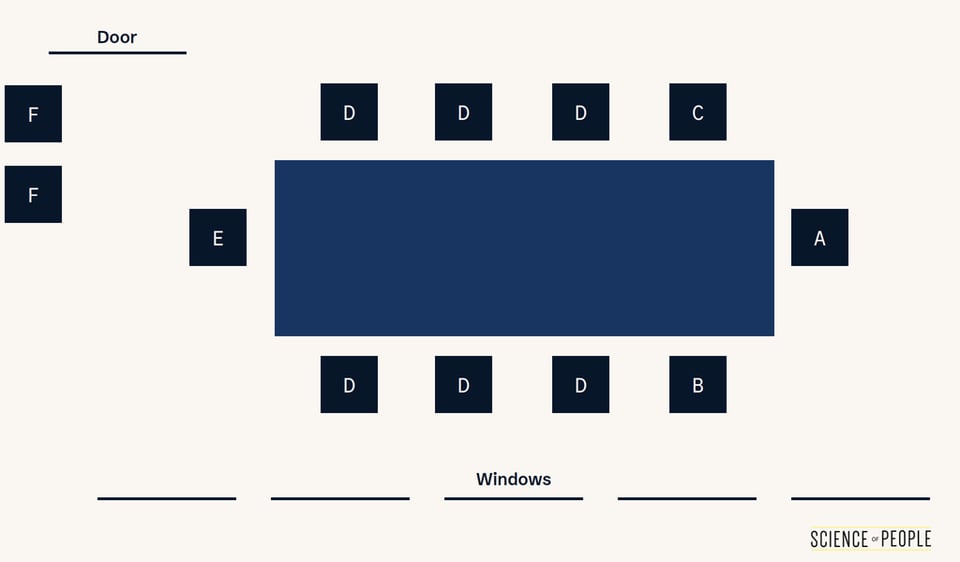
For example, if you walked into a conference room with this table… where would you sit?
In this guide, I’ll give you my formula to pick the perfect seat. Looking for the perfect place to sit in a meeting room? Part 1 is for you. Want to organize your own meeting? Part 2 has 11 seating arrangements to choose from.

What Is a Seating Arrangement?
A seating arrangement is the intentional layout of chairs, tables, and positions within a room designed to shape how people interact, communicate, and collaborate. Also called a seating plan or seating layout, the arrangement you choose affects everything from who speaks most to who feels included. Understanding seating arrangement psychology can help you take control of any meeting, classroom, or event.
Part 1: How to Pick the Perfect Seat in a Meeting
You walk into a conference room and face a huge decision:
- What’s the best seat?
- Should I sit near the boss?
- Where should I sit?!
Where you sit in a meeting matters WAY more than you think! Good news… science has real answers for us here. Let’s get the most out of that chair.
The Science of Where You Sit
Where you sit changes how people relate to you. Seating affects three things:
- People’s perceptions of you. How do you mark your territory?
- Your feelings toward others. Do you feel included or excluded?
- The status of your relationships. How close are you seated to the decision-maker?
Rooms come in two flavors: “sociopetal” arrangements, which bring people together, and “sociofugal” arrangements, which push people apart. Every conference room falls somewhere on this spectrum. (Yes, even the one with the wobbly chair.)
Now for the fun one… the shape of the table can even change how you think! A 2013 study in the Journal of Consumer Research seated people in either a circle or an angular layout, then showed them persuasive messages1:
- People sitting in a circle liked ads built around groups of friends, family, and what most people choose. The circle stirred up their need to belong.
- People sitting in angular layouts liked ads built around themselves and standing apart from the crowd. The angles stirred up their need to be unique.
Wait… the CHAIRS were doing that?!
The shape of your seating arrangement is a quiet environmental cue that changes how you think and respond to others.
Ready? Here’s how to pick the perfect place to sit in a meeting.
Step #1: Know Your Seating Game Plan
Here is a graphic of a typical conference room:
Position A: The Power Player
This seat is usually reserved for the boss, the VIP, or the person leading the meeting. This is especially true if a projector screen is behind them.
Sitting at the head of a rectangular table makes you more likely to be seen as the leader, even if you’re NOT. When people rated photos of a group seated at a rectangular table, whoever sat at the head was rated as more of a leader, more persuasive, and more self-confident than the people along the sides. They were also picked most often as the person who probably contributed the most2.
That’s a lot of credit for a chair! From the end, you can see every face at the table, and every face can see you.
Positions B & C: The Allies
The people sitting right next to the boss are usually seen as the most supportive of the Power Player. This may or may not actually be the case. However, it is handy to be able to whisper things in the boss’s ear. You also are more likely to be heard by the boss if the group is talking all at once. Dr. Richard Winters of the Mayo Clinic, who is also a professional and executive coach for healthcare leaders, calls these the flanking positions.
From a flanking seat, you can steer the meeting without running it. You can pass the boss a note that moves a topic along, bring up a point the boss forgot, or suggest the group take five minutes on the thing everyone is skipping.
Is one side of the boss better than the other? Read on to Step #6.
Position D: The Middles
The middles get less eye contact and less floor time simply because of the nature of a boardroom table. This can be a good place to go into stealth mode. If you have no choice and have to sit in the middle, be prepared to speak up if you want to be heard.
Pro Tip If you lean forward and raise your hand slightly, you can catch eye contact and attention when you want to add an important comment.
Position E: The Contender
If you are sitting opposite your boss, you better have a LOT to say! This is where the Steinzor Effect comes into play (more on this in Step #3): people are most likely to respond to whoever is sitting directly across from them. This position naturally creates a dialogue dynamic with the Power Player.
- If you want to be the Contender, be ready to speak and address the Power Player directly.
- If you do not want to be the Contender but are forced into this seat, counteract your position by being more verbally and nonverbally supportive. Smile more, nod more, and give more supportive feedback.
Pro Tip Sometimes if two people are running a meeting, they take both ends of the table. This is a great way to physically show a balanced viewpoint, with input coming from both sides.
Position F: Sideliners
Need to sneak out early? Don’t want to be heard? Aren’t a Power Player just yet? Then the sideline is for you. This can be near the door — especially if you have to leave — or as an assistant behind the boss.
Step #2: Find Your Goal or Mode
What’s your goal in a meeting? Dr. Winters breaks down seat choice by how you’d like to come across in the room. I have found we are trying to balance two behaviors in a meeting:
- Attention Mode: I want to talk a lot. I want to be heard. I want to be noticed.
- Stealth Mode: I want to talk less. I don’t want to be noticed. I may even want to observe.
Neither of these is wrong, but being purposeful matters. Stealth Mode can be great for listening in a meeting where you don’t have much to contribute to the agenda. Attention Mode can be great if you want to be noticed by the boss and take a leadership role.
So… which one are you walking in with today?
Action Step: Know your goal or mode before going into the room. This will help you make the best seating decision.
Step #3: Use the Steinzor Effect to Your Advantage
How to use the Steinzor Effect:
- Want to engage someone in discussion? Sit directly across from them.
- Want to avoid being drawn into a debate? Sit next to them instead.
- Running the meeting? Be aware that the person across from you will naturally become your primary conversation partner. If you want balanced participation, deliberately make eye contact with people in the middle seats.
One early study tracked who spoke after whom in a discussion group seated in a circle, and mapped it against where each person sat. The farther apart two people sat, the more likely one was to speak right after the other3. In a circle, the farthest seat from you is the one directly across, and the closest seats are the ones right beside you.
Why? Simple… the person across the table sits in the center of your visual field. You can see their facial expressions, their eye contact, their nods and frowns. The person beside you? They’re in your peripheral vision, which makes rapid back-and-forth conversation much harder.
People are most likely to respond to whoever is sitting directly across from them.
Have you ever noticed a quiet teammate go silent the moment they moved from the far side of the table to the chair beside the loudest person in the room? That’s the Steinzor Effect at work. The seat beside the speaker is the one least likely to answer next.
Want them to chime in? Give them a seat with a clear view of the speaker.
Step #4: Practically Speaking
Ask yourself these questions before choosing a seat:
- Do I have to leave early?
- Is there a chance I might get an urgent call?
- Will I want a coffee refill?
- Do I need easy access to the door?
These questions seem small, but they aren’t when you have to take that walk of shame out of a meeting! Before you sit down, think about your plan of action and whether you might need to get up at any point.
Nothing is worse in a meeting than when you are about to make an important point and someone is crawling over chairs to get to the door.
Don’t be THAT person!
Action Step: If you might have to leave, be a Sideliner in position F or D, near the door.
Step #5: Use the Boss as a Compass
Who’s the Big B? Your boss. The decision-maker. Your VIP should affect your seating choice.
Simply sitting near someone raises the odds you’ll bond. In one experiment, 182 school classrooms got random seating charts for a semester. By the end of it, two students seated next to each other had a 22% chance of being mutual friends, up from 15% for students not seated together4.
The same idea can work in meetings. Sit near your boss and you get more chances for quick side chats, and those small moments can add up to a closer connection.
But closeness isn’t the only factor. You also want to think about line of sight. If you have a lot to say or will be presenting, consider sitting opposite the boss so you are in their direct line of sight. This Contender position comes with some risks (see Step #1), but it can be a strong strategic choice if you want to make an impact.
Action Step: Use the boss as a compass. Decide whether you need proximity (sit beside them) or visibility (sit across from them).

Step #6: Sit Front and Center
Should you sit to the right or the left of a Power Player? Honestly… either flanking seat gives you the boss’s ear. Take the one with the clearer view of the rest of the room.
The BIGGER question is front versus back. Want to guess how much it matters?
In a large introductory physics lecture, students were randomly assigned seats. The ones placed at the back for the first half of the term were nearly six times as likely to fail as the ones who started at the front5.
Nearly SIX times! And nobody chose those seats, which points to the seat itself.
If a training or meeting is set up in rows, the front and center is where the speaker can see you. It’s also where you can see the slides without craning your neck.
Action Step: For Attention Mode, your best choices are A, B, C, and E. For Stealth Mode, go with D or F. In a room set up with rows, take a seat in the front third, as close to the center as you can.
Step #7: Circular Tables Change Everything
Circular tables are great for collaboration. If I have a choice, I always want a circular table because it’s easier for everyone to collaborate. There’s no built-in “power seat.”
The only issue with circular tables is that the Power Player, if there is one, dictates the new seating positions. The Contender is always opposite the Power Player, Allies are always to the left and right, and Middles fill in the rest.
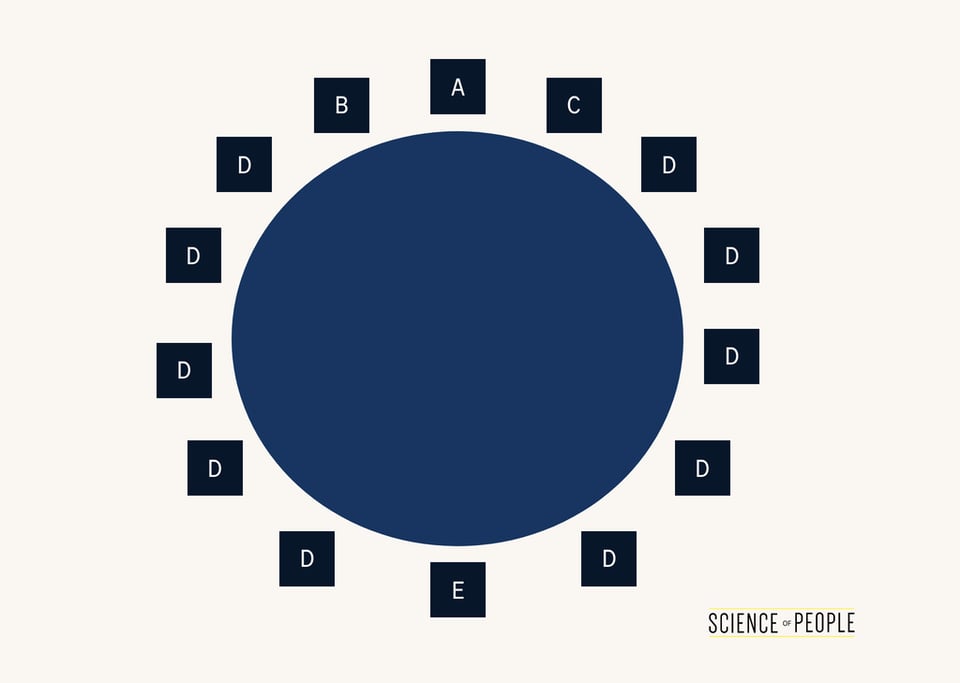
What seat do you choose? Whichever one you end up with, choose wisely!
Step #8: Expert-Level Seat-Sleuthing Tips
Yay for alliteration! Okay. So, these are truly my expert-level tips and they are only if you really want to be serious. Here’s what to keep in mind.
Be the Greeter
I always, always try to get a chair facing the door. Why? I get to smile and greet people as they walk in. This is an effective way to make a first impression if you have not met someone before and a great way to project authority and warmth as people arrive.
Arrive Early
An empty room gives you the pick of any seat. A full room leaves you stuck with whatever is left, often the Sideliner or an awkward Middle position. Get there first and claim your strategic spot!
Take Note of Patterns
People tend to take the same seats over and over again. Pay attention to where your boss normally sits. Pay attention to where the biggest talker usually sits — do you want to be able to see them more easily, hear them more easily, or be far away from them entirely?
Presentations Change the Game
If the meeting includes a slide presentation, choose the chair with the best view of the slides and presenter. Your comfort and ability to see the presentation might matter more than your spot at the table. That goes double if the presentation won’t involve much discussion.
No Head Chair? No Problem
Sometimes you get into a room and the conference table has no head chair. This was likely an attempt to equalize the room. In this case, the positions shift slightly, and the Power Player is usually assumed to be in the middle of one of the long sides.
Couch, Chair, or Swivel?
Not all seats are created equal. In a typical office you might have multiple chair choices:
- The Low Sofa: Beware of that couch! I know it looks super comfy, but there are two problems. One, it might be way lower than your business counterpart. This often gives a person the feeling of inequality—even subconsciously. Second, it’s hard to get in and out of it. I only choose a low sofa or couch if my counterpart is also sitting on the couch next to me or on another one across from me.
- The Swivel Chair: I love swivel chairs around big conference room tables. They’re great for easily making eye contact. However, if you tend to fidget or rock in your chair, plant yourself in one place. Constant motion can make you look distracted.
- Pillows & Props: We prefer to have no barriers between us and another person. Be careful of placing pillows, laptops, or clipboards in front of you. You don’t want to accidentally block someone.
The Best Seat in the House
Given all this science, you should be confident enough to make your own choices. But as a default, my favorite seat in the house is usually the highest chair with the best view of the room.
Remember: the best seat is the one that matches you and your goals.
Step #9: Pick Corner, Side, or Across for One-on-Ones
A one-on-one has no Power Player chair to plan around. It’s just two seats… and the angle between them sets the tone before anyone speaks.
When pairs of students were asked where they’d sit for different kinds of tasks, casual pairs chose the corner of the table, cooperating pairs sat side by side, competing pairs sat across from each other, and pairs doing separate work spread out6.
So before you sit down, ask yourself: What kind of conversation is this? Here’s how that plays out in three common meetings:
| The meeting | Where to sit | What that looks like |
|---|---|---|
| Catching up with a new hire | The corner, at a 90-degree angle | “Mind if I grab this corner?” You can make eye contact and look away at the table without it feeling like an interview. |
| Reviewing a budget together | Side by side | Pull your chair around so you’re both facing the same screen or printout. |
| Negotiating a raise or a deal | Across the table | Sit down facing them with your notes on the table in front of you. The across seat is built for a respectful back-and-forth. |
Sitting across from a colleague to “collaborate” on a spreadsheet? Oof. You’ve picked the competitive seat, and you’ll both spend the meeting reading the numbers upside down.
Action Step: Before your next one-on-one, decide whether it’s a chat, a joint task, or a debate, and pick the corner, the side, or the across seat to match.
A new book by Vanessa Van Edwards
Every conversation is an opportunity.
If conversations have gotten harder, more awkward or less satisfying, you’re not imagining it. We’re simply out of practice. It’s time to find the joy in talking to each other again.
Part 2: How to Set Up Conference Table Seating for Your Event
Got a big meeting coming up? One of your first big questions should be about seating arrangements:
- What is the best seating etiquette?
- Is there an ideal business seating arrangement?
Seating REALLY matters. There are lots of seating arrangements, and choosing the right one can change the entire tone of your event.
Circular seating activates our need to belong, while angular seating activates our need to be unique and stand out.
Why Is Seating Arrangement Important?
A seating arrangement can change the entire tone of your event, meeting, or get-together. The right layout can help people collaborate or bond. The wrong one? It can make people feel excluded or competitive right when you need them to cooperate.
Getting your seating arrangement right for the specific event you are planning is one of the simplest and most powerful tools available to any planner or venue coordinator. Before we get into the 11 different seating arrangements, here are a few of my favorite tips:
Seating Tip #1: Goal-Oriented Seating
Know your goal before setting up seating for a meeting. Circles stir up a need to belong, while angular layouts stir up a need to stand out.
For classrooms and training: Clusters of small tables or a full circle get people facing each other. Straight rows point everyone at the front of the room. Great for a lecture… not so great for a discussion.
Make your seats match your goals:
- If you want closeness, choose closer chairs.
- If you want collaboration, sit next to each other or in a circle.
- If you have a big room, check out the eleven basic styles of seating below and choose the one that fits.
Seating Tip #2: Shape + Distance = Success
The formation of the seating arrangement and the type of chair are not the only things that matter. Distance between participants is also important.
- The propinquity effect: The closer you are to someone, the closer you feel. A random seating chart made seatmates more likely to be friends, as the classrooms in Step #5 showed.
- Center vs. edges: When three people sat in a row to work on a timed numbers task together, the person in the middle claimed about 38% of the credit, close to a fair third. The two people on the edges each claimed about 45%7. The middle person could see both partners’ work, so they knew how much each one had done.
- Co-ops and Corners: When you’re working on something together, sit side by side so you can look at the same paperwork or screen. Save the corner of the table (a 90-degree angle) for a relaxed conversation, where it allows easy eye contact without feeling confrontational (see Step #9).
Action Step: As an event planner, take into account the distance of chairs and whether people can see each other. If we can see one another, we are more likely to understand and recognize each other. If we are close to one another, we are more likely to feel connected.
Seating Tip #3: Fine-Tune Your Office
These tips are for setting up easy seating choices. Here’s how to make it easy on your guests and colleagues:
- Chairs should be equal. Don’t have a couch with a low settee and a few high chairs. Everyone will be at different heights and different comfort levels.
- Remove Props. No pillows, because people either grab them or have trouble sitting around them. The only worthwhile prop is a small bowl of candy or mints.
- Maximize Eye Contact: Make sure people can see each other from every seat in your office. If you have chairs along a back wall, people in those seats will feel left out. Give everyone equal seating opportunities.

Seating Tip #4: Assign Seats to Mix the Room
Say it’s 20 minutes before the team offsite dinner, and you’re walking the tables with a stack of name cards, splitting up the finance team. Good instinct!
Left alone, people sit with the colleagues they already know. Since sitting near someone makes a friendship more likely (remember the classrooms in Step #5), your seating chart decides who spends the evening talking to whom.
Try the one-of-each rule: give every table one person from each team, and split up anyone who works side by side all week. Here’s a 16-person offsite seated with that rule:
| Table 1 | Table 2 | Table 3 | Table 4 |
|---|---|---|---|
| Finance: Priya | Finance: Marcus | Finance: Dana | Finance: Leo |
| Sales: Tom | Sales: Aisha | Sales: Ben | Sales: Rosa |
| Ops: Keiko | Ops: Sam | Ops: Nadia | Ops: Omar |
| Product: Jo | Product: Eli | Product: Fern | Product: Raj |
Put the name cards out before anyone arrives. If the cards are already on the table, nobody has to decide whether it’s rude to break up the usual group. (Let the name cards be the bad guy!)
Action Step: For your next team dinner or workshop, write out a quick chart with one person from each team at every table.
Seating Tip #5: Let the Task Pick the Layout
Here’s a question to ask before anyone moves a chair: What will people actually DO in this room?
A review of classroom seating studies came to a simple rule… let the task decide the layout. Students behaved better during solo work when they sat in rows, and the students who tended to be disruptive gained the most8.
We use the same rule for meetings. Figure out the job the room has to do, then match it to one of the layouts below:
| What the room needs to do | Try this layout | Why it fits |
|---|---|---|
| Everyone works or takes notes on their own | Classroom or Herringbone | Rows face forward, with a table for laptops and notes. |
| Listen to one speaker, with little discussion | Theatre | The most seats in the room, all facing the front. |
| Talk it out as a group | Hollow Square or Boardroom | Everyone can see everyone else’s face. |
| Work in small groups, then share with the room | Cabaret | Tables for the group work, plus an open end facing the front. |
| Meet new people | Cocktail or Lounge Zone | People can move around and mingle. |
Got a meeting that does two jobs? That’s common! Cabaret handles both. People work at their tables, then turn their chairs toward the front when it’s time to share.
Action Step: Before you book a room, write down the ONE thing people will spend the most time doing. Then pick the layout from the table above.
11 Seating Arrangements Used for Events
Staging Connections put together a great overview of 11 different kinds of seating arrangements for your meeting. They have kindly allowed us to share them with you here:
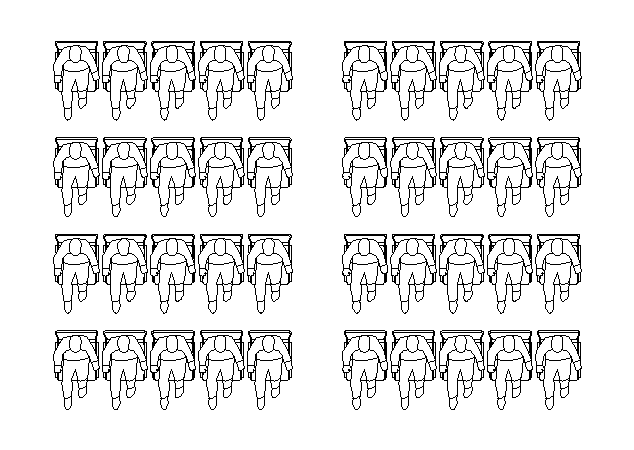
#1: Theatre
Positives:
- All seats face forward toward the front of the venue.
- Maximum seated capacity is achieved.
Negatives:
- The audience is closed in, needing to push past other audience members to enter or exit.
- Aisles are required for sufficient access.
- No provision for note-taking or plated food and beverage.
- Audience interaction is limited since members don’t face each other.
This layout is popular for meetings and product launches.
#2: Classroom
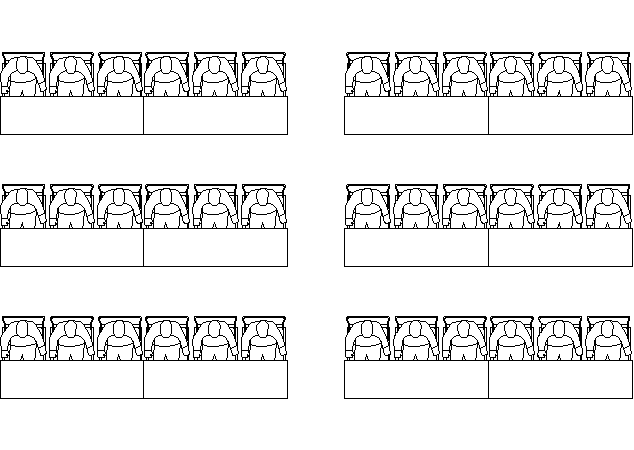
This style reflects the seating found in a school or lecture theatre, with chairs and trestle tables aligned in consecutive straight rows.
Positives:
- All seats face forward.
- Allows for note-taking and consumption of plated food and beverage.
Negatives:
- The audience is closed in, making it difficult to enter or exit.
- Aisles are required for sufficient access.
- Seating capacity is reduced by the trestle tables.
- Audience is less likely to interact as they are not facing each other.
This layout is popular for training, conference-style seating, sales kick-offs, and product launches.
#3: Herringbone
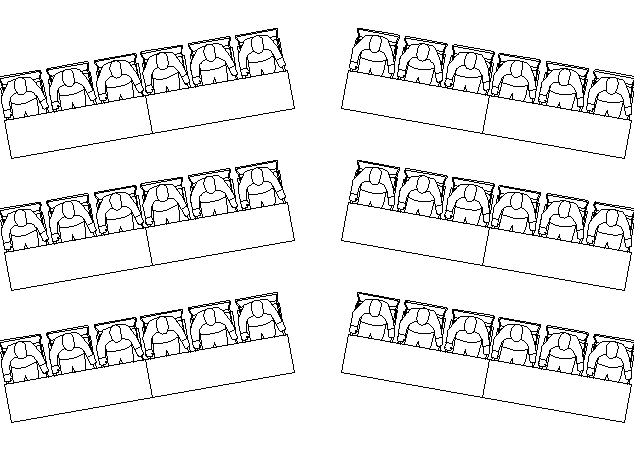
This style is very similar to Classroom, however each consecutive row of chairs and tables is angled inward.
Positives:
- All seats are angled inward toward the podium.
- All seats face forward toward the front of the room.
- Allows for note-taking and plated food and beverage.
Negatives:
- The audience is closed in, making it difficult to enter or exit.
- Aisles are required.
- Seating capacity is reduced by the trestle tables.
- Audience is less likely to interact.
This layout is popular for training, conferences, and lectures.
#4: U-Shape
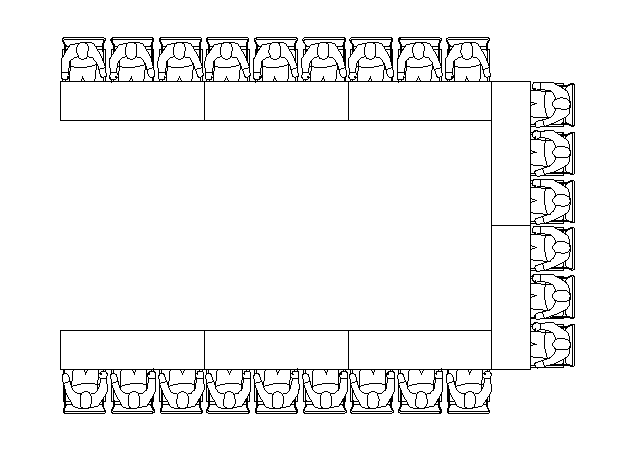
As the name suggests, this style is in the shape of the letter U, with tables and chairs arranged in an open-ended configuration with the audience facing inward.
Positives:
- The open end allows for a focal point or presentation area.
- The presenter can approach and engage with each audience member.
- Audience interaction is easier, with members facing each other.
Negatives:
- Inefficient use of floor space, with seating capacity reduced.
- A large proportion of the audience is seated side-on to the presentation area.
This layout is popular for training, conferences, workshops, and meetings.
#5: Horseshoe
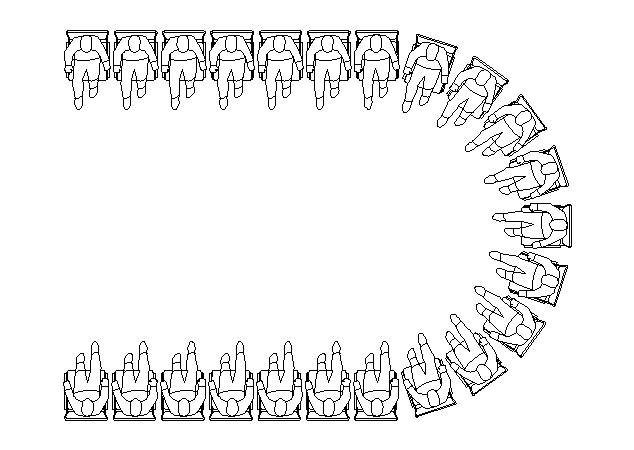
This style is very similar to U-Shape, however there are no tables, only chairs arranged in an open-ended configuration with the audience facing inward.
Positives:
- The open end provides a focal point and presentation area.
- Allows the presenter to approach and engage with each audience member.
Negatives:
- Inefficient use of floor space.
- Aisles are required for access.
- No provision for note-taking or plated food and beverage.
This layout is popular for large meetings, presentations, and team briefings.
#6: Hollow Square
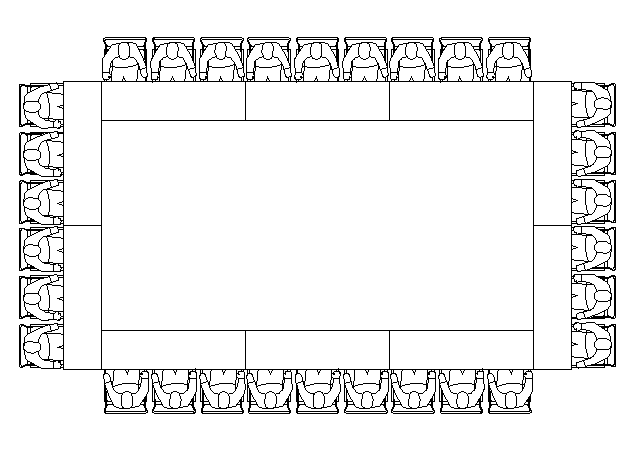
This style is similar to U-Shape, however there are four sides and no open end, with the audience all facing inward.
Positives:
- Audience interaction is easiest, with everyone facing each other.
- Allows audience to consume plated food and beverage easily.
Negatives:
- Seating capacity is reduced.
- Does not allow for a main presentation area or focal point.
This layout is popular for discussions.
#7: Boardroom
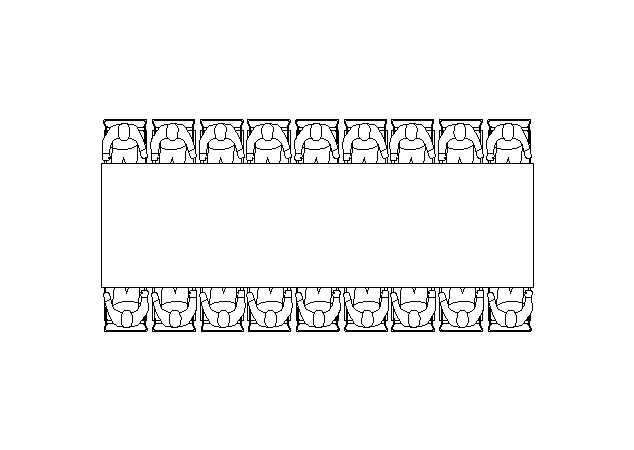
This style is a smaller version of the Hollow Square or U-Shape, with a large elongated table and the audience all facing inward.
Positives:
- Encourages audience interaction as they all face inward.
Negatives:
- Restricts the position of a presentation area, typically to the end of the table.
This layout is popular for small meetings, one-on-one interviews, small presentations, and team briefings.
#8: Banquet
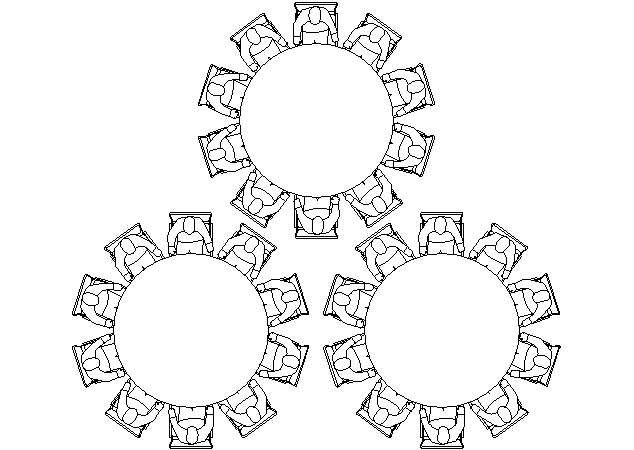
This style is similar to a round dinner table, with the audience seated around the circumference facing inward.
Positives:
- Audience interaction is easiest, with everyone facing each other.
Negatives:
- The audience is closed in, needing to push past others to enter or exit.
This layout is popular for gala dinners, awards nights, holiday parties, weddings, and other informal events.
#9: Cabaret
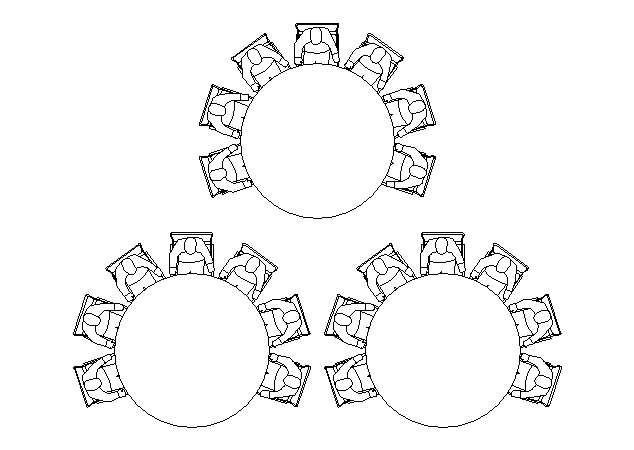
This style is similar to Banquet, however there is an open end, with the audience seated in an arc facing forward.
Positives:
- The open end allows for a focal point or presentation area.
Negatives:
- Inefficient use of floor space.
This layout is popular for training sessions, awards nights, and gala dinners.
#10: Cocktail
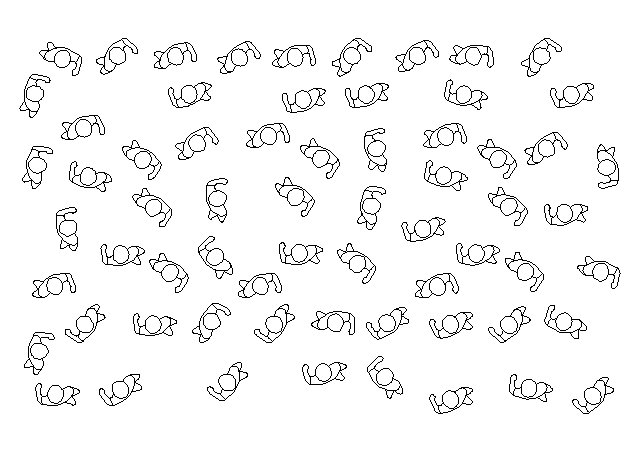
This style has no chairs or tables. It is standing space.
Positives:
- Most efficient use of floor space, with maximum room capacity available.
- Audience interaction is easy, with people able to freely mingle.
Negatives:
- Audience is standing with no opportunity to sit and rest.
- Does not allow for note-taking or plated food and beverage.
This layout is popular for cocktail parties, weddings, holiday parties, and other social events.
#11: Lounge Zone
To refresh the formal vibe and encourage networking, event planners are opting to include a Lounge Zone. Add sofas, chairs, coffee tables, bar tables, and ottomans in clusters to form this creative space.
Positives:
- Great for encouraging networking and giving attendees an informal area to relax and mingle.
- Can create a sense of space within a larger venue, and the furnishing style can carry your event’s theme.
Negatives:
- Some venues don’t have the space for a lounge zone.
- A relaxed, styled area may not suit all event types.
Bonus: When to Skip the Chairs Entirely
Sometimes the best seating arrangement is no seats at all! In a room with no chairs, creative groups got less territorial about their ideas, built on each other’s more, and tended to do better work9.
Standing also saves time. How much? In an experiment with five-person groups, sit-down meetings ran 34% longer than stand-up meetings, and the extra time didn’t produce better decisions10.
When to stand:
- Quick status updates under 15 minutes
- Brainstorming sessions where you need creative energy
- Team check-ins where you want to reduce hierarchy
When to sit:
- Deep analysis or number-crunching sessions
- Long strategic planning meetings (45+ minutes)
- Any meeting requiring heavy note-taking
Pro Tip Take the chairs out of the room before people arrive. If the chairs are there, people usually sit… however much you meant to keep it quick. A tall counter or a whiteboard wall gives everyone somewhere to put a coffee and a marker.
Virtual Meetings: Seating Still Matters
Even on Zoom, position matters! The grid you see on screen is your seating chart.
Here’s how to apply seating psychology to virtual meetings:
- Use gallery view for collaborative discussions, which mimics circular seating where everyone can see everyone.
- Pin or spotlight key speakers to create a clear Power Player position.
- Hosts can use drag-and-drop in platforms like Zoom to create custom seating charts and enable “Follow Host’s Video Order” so everyone sees the same layout.
- Turn your camera on. The Steinzor Effect depends on seeing faces. When cameras are off, you lose the nonverbal cues that tell people when to jump in.
For more on looking and sounding your best on camera, check out our Zoom tips.

Put the Camera On for Talking and Off for Listening
Cameras are a trade-off… and this one has been tested. In a four-week field experiment, researchers switched employees’ cameras on or off for their virtual meetings. Camera-on days went with more fatigue, and that fatigue went with speaking up less and feeling less engaged in meetings. Keeping the camera on was especially tiring for women and for newer employees11.
So what’s the call? Think about what each meeting is for.
Discussion, decisions, or a tough conversation? Cameras on, so people can read each other’s faces (the Steinzor Effect needs faces to work!). A long update where most people are just listening? Camera-off is fine, and the host can say so up front.
Try This: Put one line in the invite: “Cameras optional for this one. It’s a listen-only update.”
Seat the Hybrid Room So Everyone Gets a Face
In a hybrid meeting, the remote people’s “seat” is the screen on the wall. The people in the room decide whether that seat is a Power Player chair or a Sideliner spot!
A few fixes we’d make before the meeting starts:
- Put the screen and camera at the end of the table. That way the remote faces sit where everyone in the room already looks.
- Fill the chairs that face the camera first. Otherwise the people on the call spend the meeting looking at the backs of heads.
- Call on remote people by name before the room moves to the next topic. It’s easy to forget the screen when the conversation in the room is moving fast.
- If only one or two people are remote, consider having everyone join from their own laptop. Then nobody gets stuck in the corner of the grid.
Frequently Asked Questions
What is a seating arrangement?
A seating arrangement is the planned layout of chairs, tables, and positions in a room designed to shape how people interact. Common types include boardroom, U-shape, classroom, theatre, and circular layouts. The right arrangement depends on your goal: collaboration, presentation, discussion, or networking.
Is it "seating arrangement" or "sitting arrangement"?
“Seating arrangement” is the correct standard English term in both British and American English. “Sitting arrangement” is occasionally used in some regional dialects but is considered less precise in professional writing. Similarly, the correct terms are “seating plan” (not “sitting plan”) and “seating area” (not “sitting area”).
What are the three most common types of seating arrangements?
The three most common types are boardroom (rectangular table with chairs around it), classroom (rows of chairs and tables facing forward), and U-shape (tables and chairs in an open-ended U formation). Each serves a different purpose: boardroom for discussion, classroom for presentations, and U-shape for interactive workshops.
What is the best seating arrangement for group work?
Circular or cluster seating is best for group work, because everyone can see everyone else. People seated in a circle also respond more warmly to messages about family, friends, and what most people choose. Small clusters of four to six people at round tables combine the benefits of circular seating with manageable group size for productive collaboration.
What is the psychology behind seating arrangements?
Seating arrangement psychology is based on research showing that physical position affects perception, participation, and power dynamics. People at the head of a table are more often seen as leaders. In a circle, people tend to respond to whoever sits farthest from them, which is usually the person across the table (the Steinzor Effect). And sitting near someone raises the odds of being friends (the propinquity effect). Table shape also matters, with circles stirring up a need to belong and angular layouts a need to stand out.
How does seating arrangement affect learning?
Seat position can change how well students do. In one large introductory physics course with randomly assigned seats, students placed at the back for the first half of the term were nearly six times as likely to fail as students who started at the front. Circular and cluster arrangements get students facing each other, which makes discussion easier than it is in traditional rows.
Where should the leader sit in a meeting?
At a rectangular table, the head seat is the leader’s chair. People seated there tend to be rated as more of a leader, more persuasive, and more self-confident than the people along the sides. If you’re leading and want everyone to feel heard, a round table removes the head seat. Making eye contact with the middle seats also helps spread out who talks.
Should I sit across from someone or next to them in a one-on-one?
It depends on the conversation. In seating-preference research, pairs having a casual chat chose the corner of the table, pairs working together sat side by side, and competing pairs sat across from each other. So a friendly catch-up suits the corner, reviewing a document together works best side by side, and a negotiation calls for the seat across.
What is the best seating arrangement for a large meeting?
For a large group that mostly needs to listen, theatre seating fits the most people facing the front. If people need to take notes or use laptops, classroom or herringbone rows add tables. If the group needs to talk in smaller teams, cabaret seating at round tables gives each team a table and still faces the front.
Seating Arrangement Takeaway
The psychology of where you sit is one of the simplest tools you have for shaping how meetings go. Here are your key action points:
- Know your mode before entering the room: Attention Mode or Stealth Mode.
- Use the Steinzor Effect. Sit across from whoever you want to engage with, and next to anyone you want to avoid debating.
- Use the boss as a compass. Proximity builds connection, and direct line of sight builds visibility.
- Sit front and center in any room set up with rows, and take the flanking seat with the clearer view of the room.
- Match table shape to your goal: circles to build a sense of belonging, angular layouts when you want people to stand out.
- Consider standing for short meetings under 15 minutes to cut meeting length and make people less territorial about their ideas.
- Apply these principles virtually. Gallery view, cameras on, and strategic speaker spotlighting all translate seating psychology to video calls.
- Before your next one-on-one, decide whether it’s a chat, a joint task, or a debate, and take the corner, the side, or the across seat to match.
- Before you book a room, name the one thing people will spend the most time doing, and pick the layout that fits it.
- Decide camera-on or camera-off for each virtual meeting based on whether people need to talk or just listen.
The best seat in the house is the one that matches you and your goals.
- Journal of Consumer Research
- Psychological Reports
- Journal of Abnormal and Social Psychology
- PLOS ONE
- The Physics Teacher
- Sociometry
- Negotiation and Conflict Management Research
- Support for Learning
- Social Psychological and Personality Science
- Journal of Applied Psychology
- Journal of Applied Psychology